




Skip to content
PDF templates for Dynamics 365 CE · the CRM in the cloud

Design once. Print every document.

The designer for quotes, invoices, packing lists, production orders and any other document from Microsoft Dynamics 365 Customer Engagement (CE), the CRM in the cloud: Sales, Customer Service and your own apps on Dataverse. With AI from Copilot or your own AI chat, with e-invoicing to the XRechnung and ZUGFeRD standards, and with PDF generation that runs entirely in your own environment.

  • No external PDF server
  • Unlimited documents
  • E-invoicing: XRechnung, ZUGFeRD
  • AI: Copilot or your own AI chat
  • Buy once or subscribe
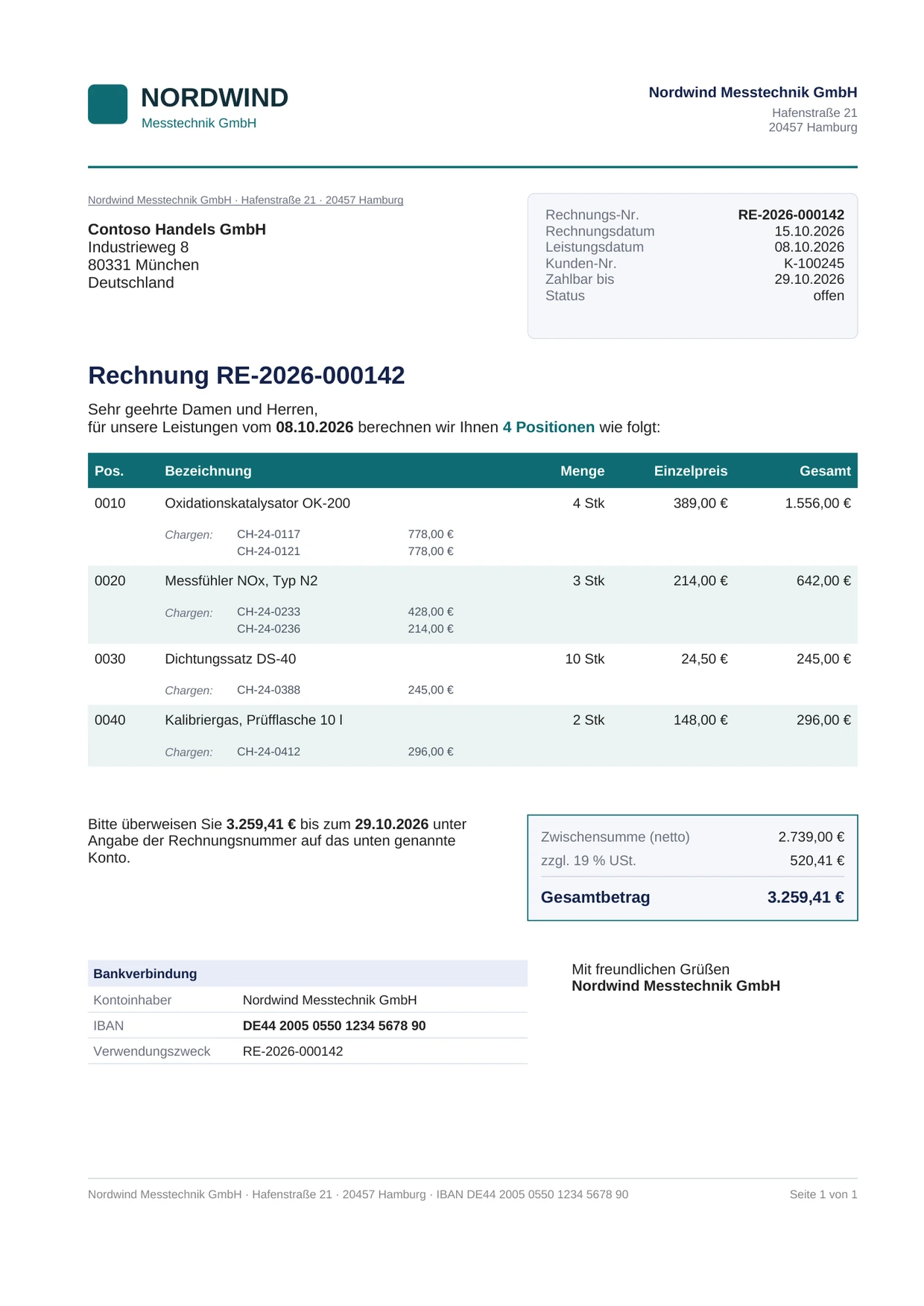
Invoice RE-2026-000142 from Nordwind Messtechnik GmbH to Contoso Handels GmbH, status open, four line items with batches, total €3,259.41.
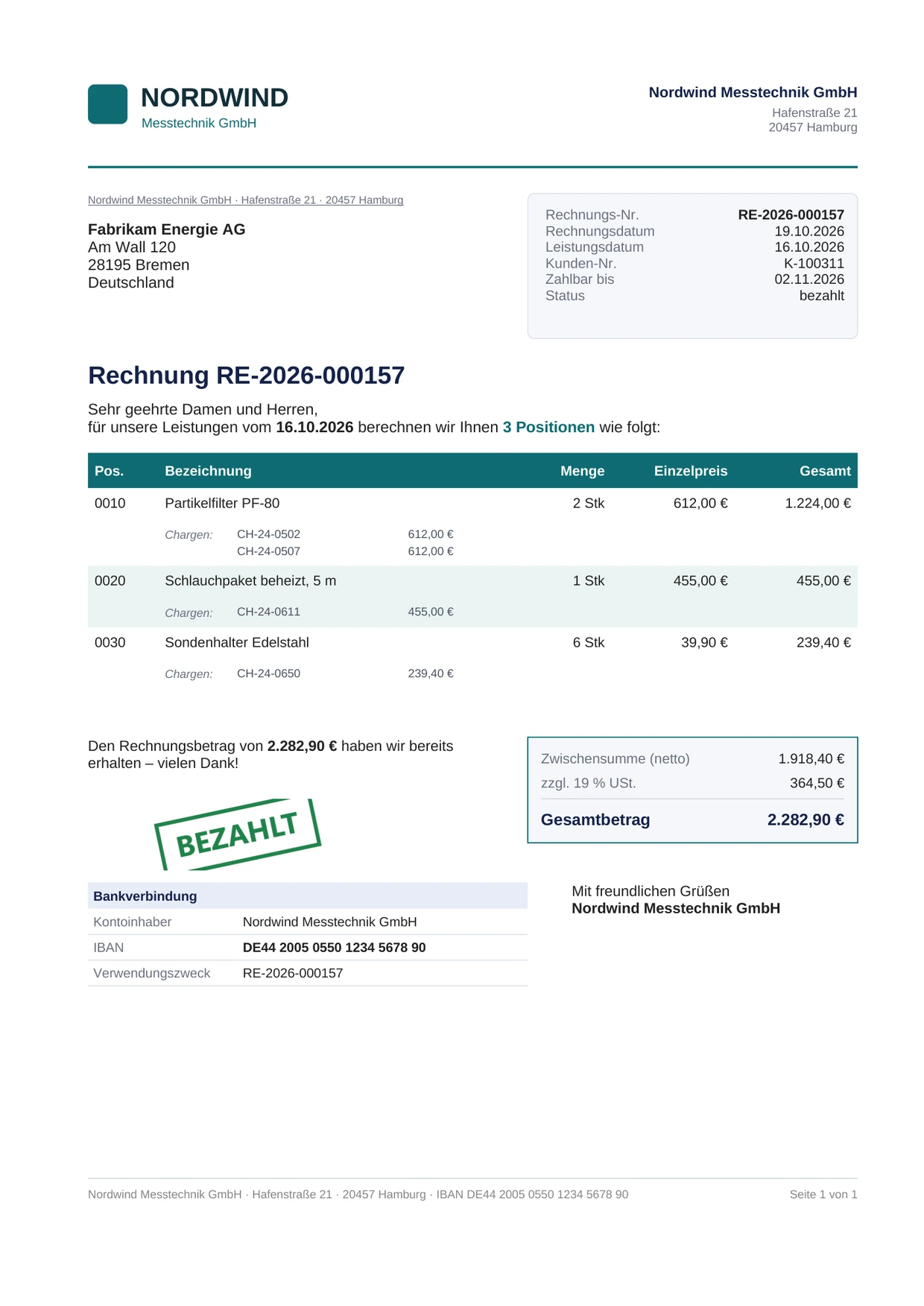
Invoice RE-2026-000157 to Fabrikam Energie AG with the stamp “BEZAHLT” (paid) and a thank-you for the amount already received.
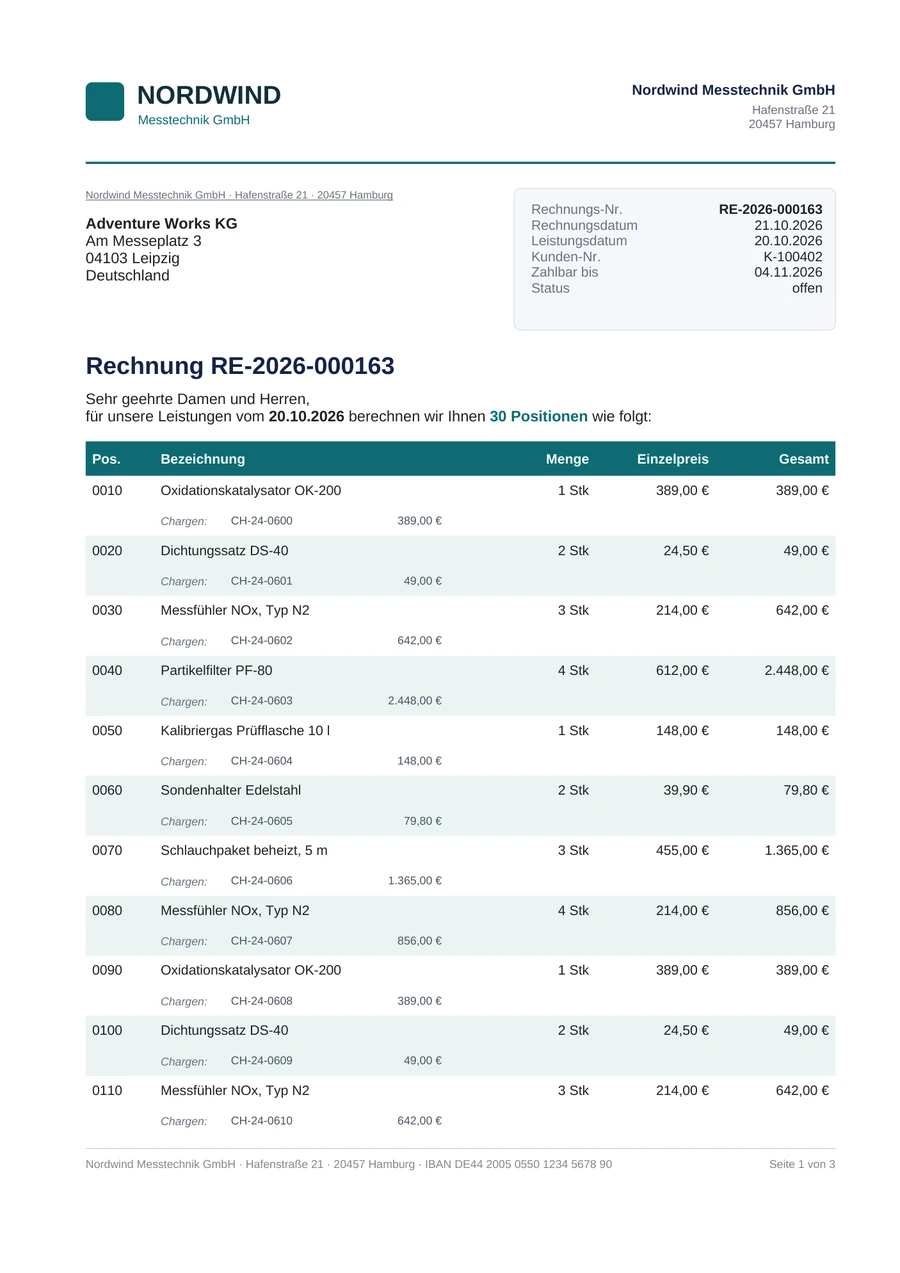
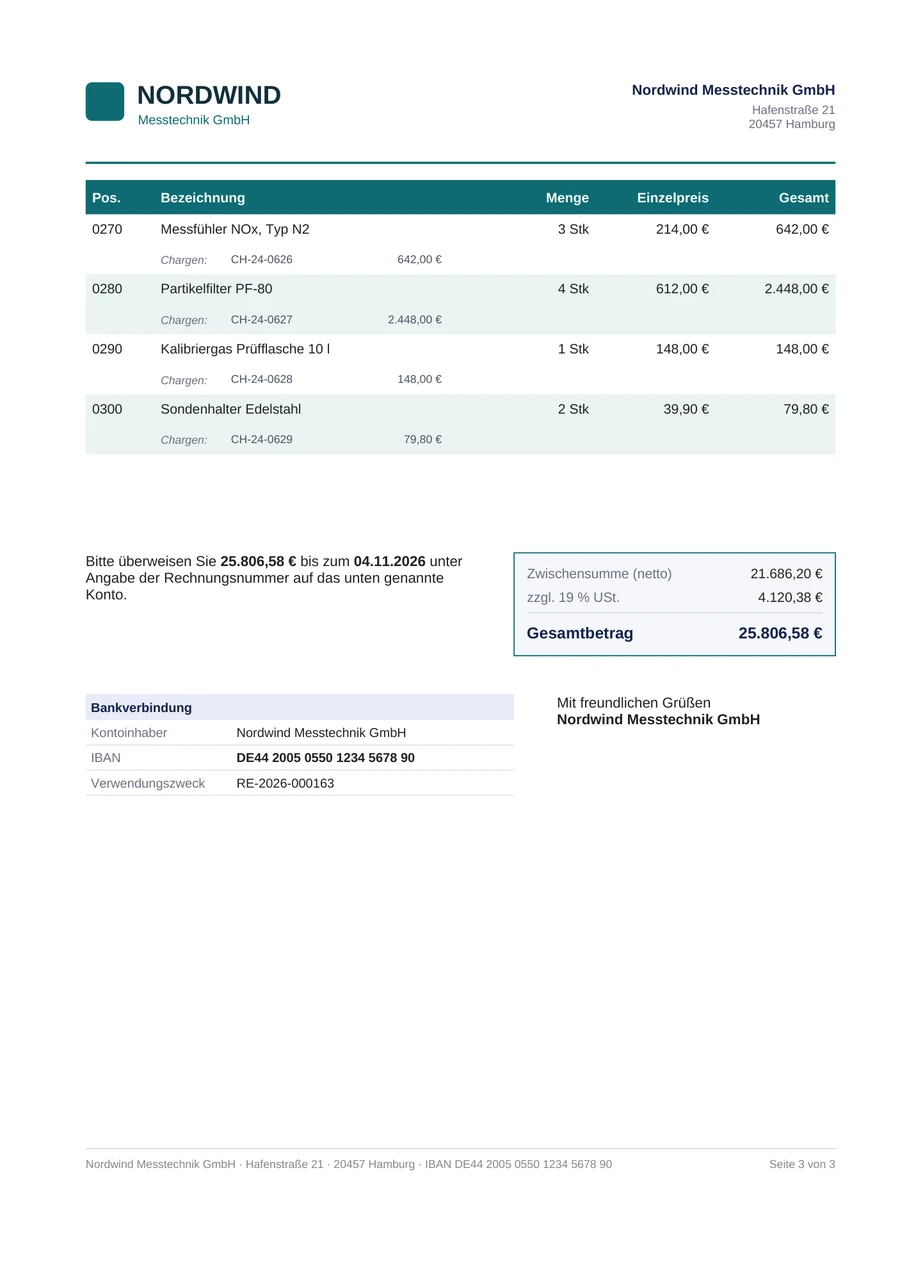
First of three pages of invoice RE-2026-000163 to Adventure Works KG with 30 line items.
Three real PDFs from the same template, generated by the Smart Templates plugin in Dynamics 365. Companies and figures are fictitious. The samples are in German; you write your documents in any language.
The designer

As easy as a word processor. As precise as a form.

The designer runs as an app in Dynamics 365, with nothing to install on workstations and no second sign-in. The design surface shows the page in the same font and with the same dimensions as in print.

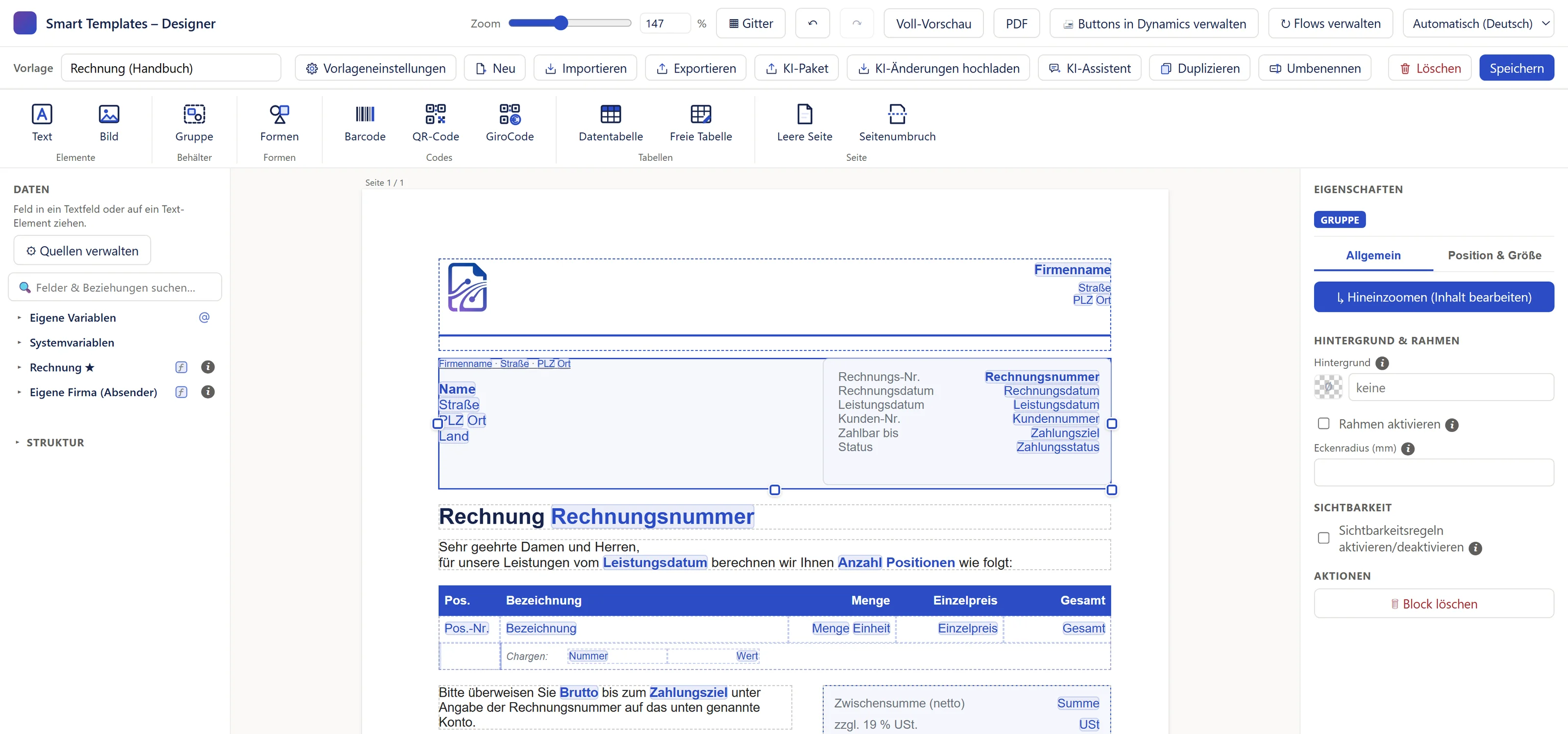
The designer with an invoice template (German interface): header bar, template row and ribbon at the top, including the “Codes” section with Barcode, QR code and GiroCode, the “Daten” (Data) pane on the left, the page with blue field markers in the middle, and the properties of the selected group on the right.
The designer in the “Smart Templates” app, here with the invoice template from the manual. The screenshot shows the German interface; the designer is available in English as well.

Groups and columns as a workspace of their own

A double-click opens the address block, the totals block or a table column in a designer of its own. What you design in a column applies to every row.

Keep together or split

If a block no longer fits at the bottom of the page, it moves to the next page as a whole. Alternatively, you can let texts and groups be split at the page edge.

Full preview with real values

One click shows the document as a real PDF with the data of your sample record, the same way the button will produce it later. Even before you save.

With AI

Tell your AI what should change.

Smart Templates works with Microsoft 365 Copilot and with any other AI chat, such as ChatGPT, Claude or Gemini. The AI builds the change, the designer applies it as a single step, and you decide with “Save”.

Switching over

Your old Word templates, rebuilt by AI.

Give your AI chat your current Word template together with the AI package from the designer. It builds a template for Smart Templates from it, with your fields from Dynamics. You open it via “Import” and only fine-tune it.

  1. Word templatethe one you use today
  2. AI packagetables, fields, template format
  3. AI chatbuilds the new template
  4. “Import”check, refine, save

The Smart Templates Assistant in Copilot

It works right next to the designer. It reads your template, the tables and sample data itself from Dynamics, with your permissions, and checks every change against the sample data before handing it over. A few seconds later it is in the open template; Ctrl+Z takes it back.

  • “Below the items, add the total of the items.”
  • “For the logo at the top left: if the invoice is paid, show the Paid stamp instead.”
  • “Below the table, add the line Thank you for your order.”

It never saves by itself and doesn’t call any other actions. It requires Microsoft 365 Copilot, with a license or Copilot credits; the administrator sets it up once.

The assistant in the manual (German)
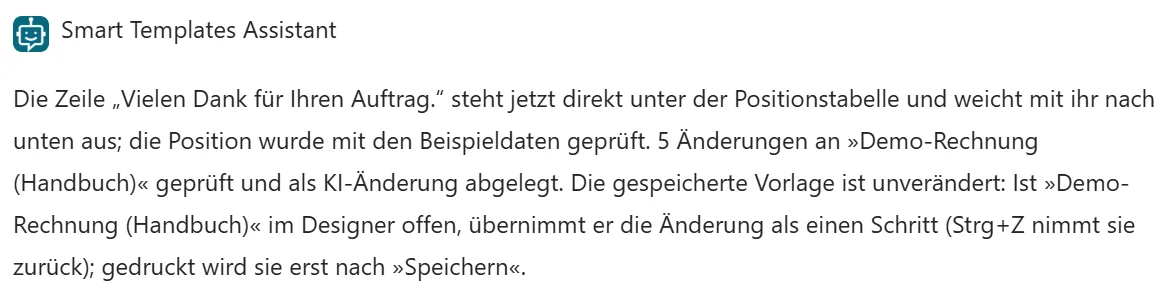
Input field of Microsoft 365 Copilot (in German): “Template ‘Demo-Rechnung (Handbuch)’: Add the line Vielen Dank für Ihren Auftrag below the table.”
Reply from the Smart Templates Assistant: the line now sits directly below the items table, checked against the sample data and saved as an AI change.
Message in the designer: “Copilot has changed the template … Ctrl+Z undoes it.”
A few seconds later in the designer.

Any other AI, with the AI package

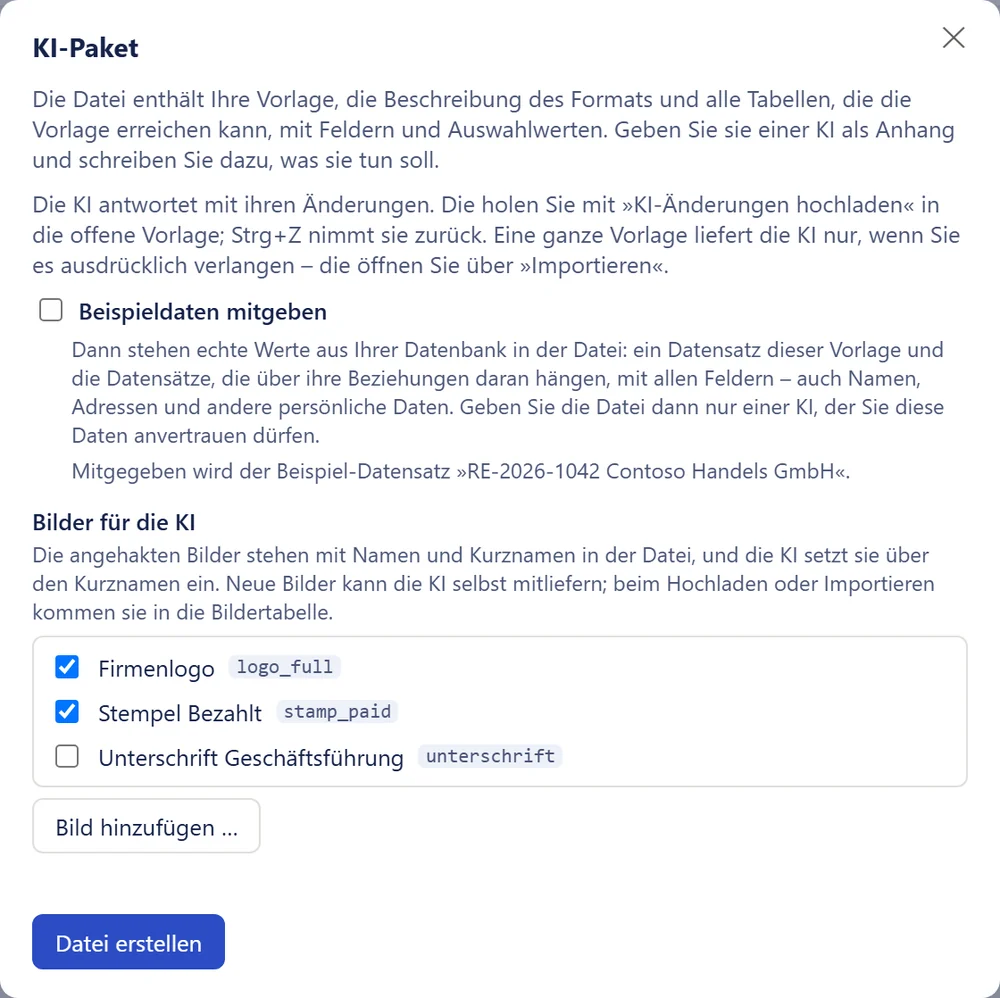
One click on “AI package” creates a file with your template, the description of the template format and all tables the template can reach. You hand it to your AI chat; you bring its answer back into the open template with “Upload AI changes”.

  • The AI chat your company already uses
  • Nothing to set up, no Copilot license needed
  • The AI only gets real values if you tick “Include sample data”
Your AI knows the manual, too.

The whole manual is available as a single file for AI assistants. With it, your AI chat walks you through Smart Templates step by step.

Download the manual for your AI (German)
The AI package in the manual (German)
The “KI-Paket” (AI package) window in the German interface: description of the file, the checkbox “Beispieldaten mitgeben” (include sample data), the images for the AI with short names and the button to create the file.
The AI package window: you decide what the AI gets.
E-invoicing

XRechnung and ZUGFeRD from the same template.

Since 2025, companies in Germany have had to be able to receive e-invoices; from 2027, the obligation to issue them begins to phase in. Smart Templates creates the e-invoice from the template you already use to print your invoices.

  • ZUGFeRD and Factur-X: The PDF carries the XML file inside it. Your customer reads the document, their accounting reads the data.
  • XRechnung as a pure XML file, for example for public authorities.
  • Invoices, partial and final invoices, cancellation invoices and credit notes
  • You assign totals and taxes from the same fields and variables your document prints. Smart Templates calculates nothing itself.
  • If a mandatory field is missing or the amounts don’t add up, you get a clear message instead of an invalid invoice.
  • Assignment is done in a window of its own, every entry with an explanation in plain language. If you like, the AI does it for you.
E-invoicing in the manual (German)
Invoice RE-2026-000142 to Contoso Handels GmbH as a PDF.
factur-x.xmlembedded in the PDF
<rsm:CrossIndustryInvoice>
  <ram:ID>RE-2026-000142</ram:ID>
  <ram:TypeCode>380</ram:TypeCode>
  …
  <ram:SellerTradeParty>
    <ram:Name>Nordwind Messtechnik GmbH</ram:Name>
  <ram:BuyerTradeParty>
    <ram:Name>Contoso Handels GmbH</ram:Name>
  …
  <ram:TaxBasisTotalAmount>2739.00</…>
  <ram:TaxTotalAmount currencyID="EUR">520.41</…>
  <ram:GrandTotalAmount>3259.41</…>
</rsm:CrossIndustryInvoice>
  • XRechnung
  • ZUGFeRD
  • Factur-X
The invoice from above as a ZUGFeRD invoice: the document stays as it is, the data is added as XML (schematic, simplified excerpt).
What your documents can do

Even the difficult documents.

Long item lists, special cases per customer, totals per tax rate: there are dedicated tools for these. You don’t have to program.

Tables across many pages

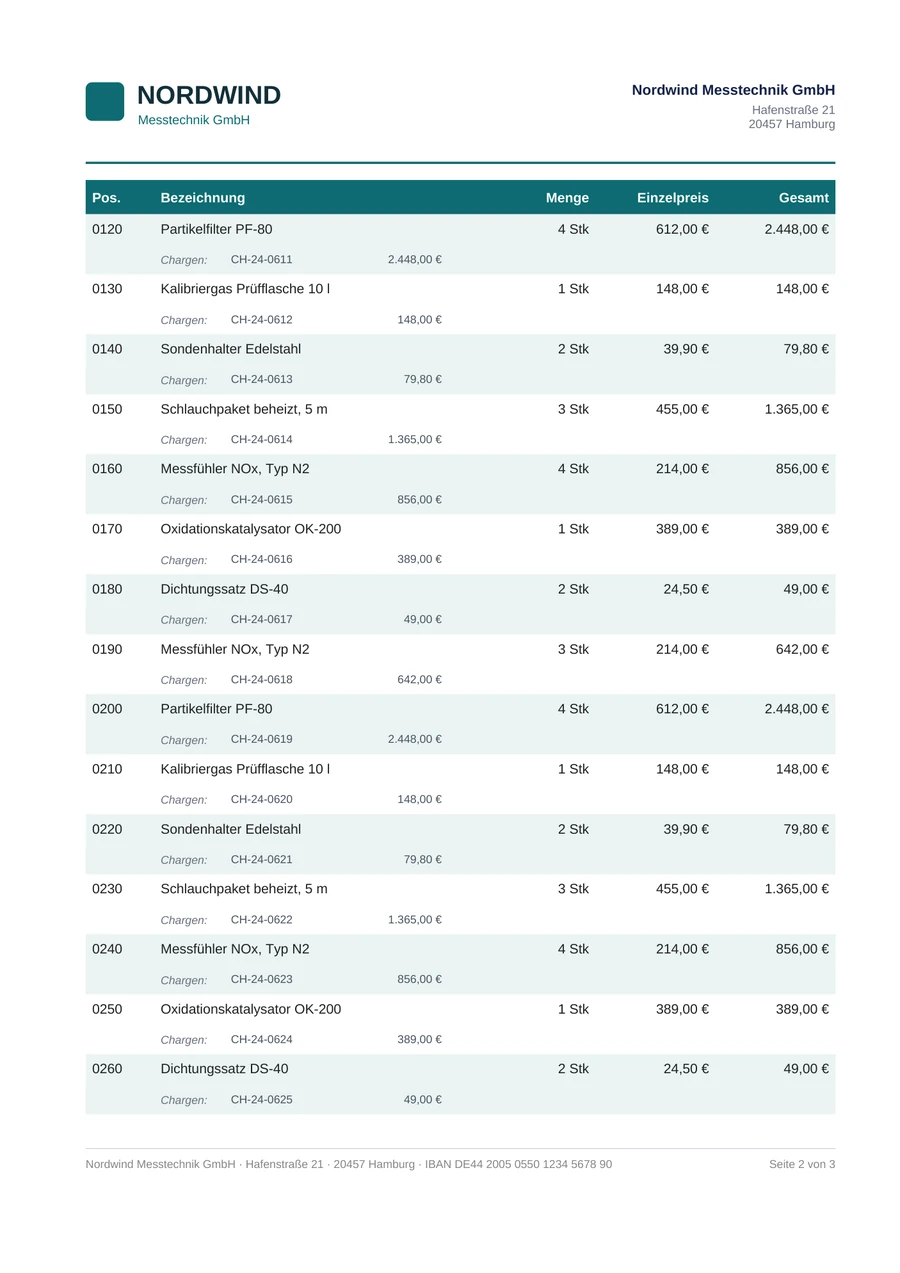
A data table fetches the rows from Dynamics, for example the line items of an invoice. When it runs past the page, its header row repeats on every following page. A cell may contain another table again, for example the batches for each line item.

  • Header and footer on every page, with “Page 2 of 3”
  • Zebra stripes, borders and merged cells
  • Free-form tables for the address block, bank details or signatures
Data tables in the manual (German)
Page 1 of an invoice with 30 line items: letterhead, address, start of the items table. Page 2: the items table continues, its header row is at the top again. Page 3: the last items, the totals block and the bank details.
An invoice with 30 line items across three pages.

If-then without a line of code

You build conditions from blocks: pick a field, pick a comparison, enter a value. With them you control texts, images, whole areas and number formats.

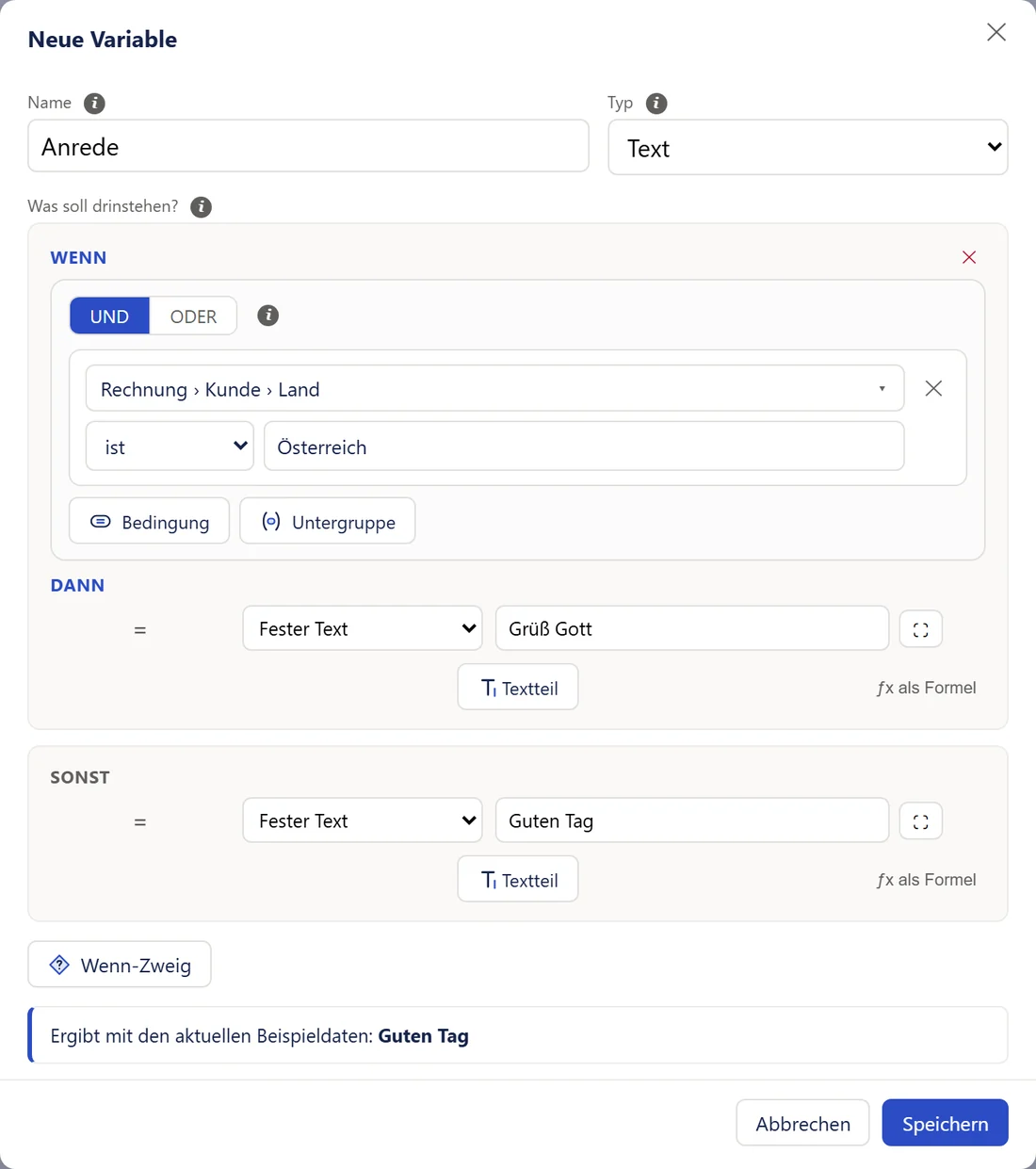
  • “Grüß Gott” for customers in Austria, “Guten Tag” for everyone else
  • The “BEZAHLT” (paid) stamp only on paid invoices
  • Areas that appear only for certain records
Conditions in the manual (German)
The “Neue Variable” (new variable) window for the salutation, in the German interface: if Invoice › Customer › Country is Austria, then “Grüß Gott”, otherwise “Guten Tag”. Below: with the current sample data the result is “Guten Tag”.
Excerpt of a paid invoice: “We have already received the invoice amount of €2,282.90 – thank you!” (in German) and the green “BEZAHLT” (paid) stamp.
Paid: a different sentence, a stamp, a status. All from the same template.

Rules decide what goes on the document

A rule filters, sorts and summarizes: only items with a quantity above zero, sorted by item number, or the total per tax rate. Its result then appears in the data tree like any other field.

  • Relationships up to six steps deep, for example from the quote to the customer to their contact person
  • Sum, count, average, smallest and largest value
  • Rounded first, then summed: the total matches the printed lines
Rules in the manual (German)
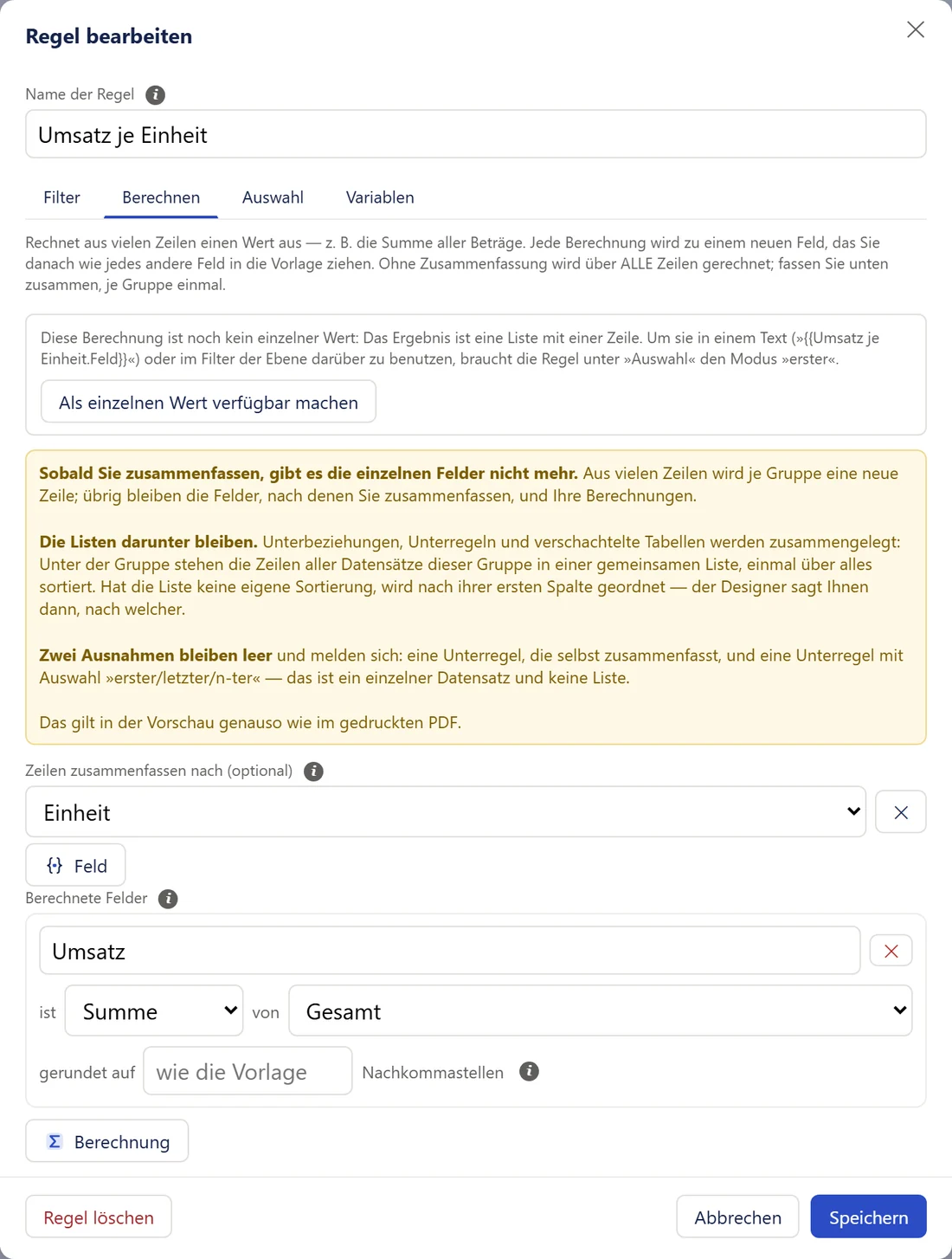
The “Regel bearbeiten” (edit rule) window in the German interface, “Berechnen” (calculate) tab: summarize rows by unit; the calculated field “Umsatz” (revenue) is the sum of the total, rounded like the template.

Numbers, currency and dates the way your customer reads them

Each template has a template language for dates and numbers. The currency is taken from the record, or switches via an if branch, for example to dollars for customers in the USA.

  • Decimal places, thousands separator and notation per template
  • Date arithmetic: due date equals invoice date plus 14 days
  • Your own variables: fixed, calculated, or by condition
Numbers, currency and dates in the manual (German)
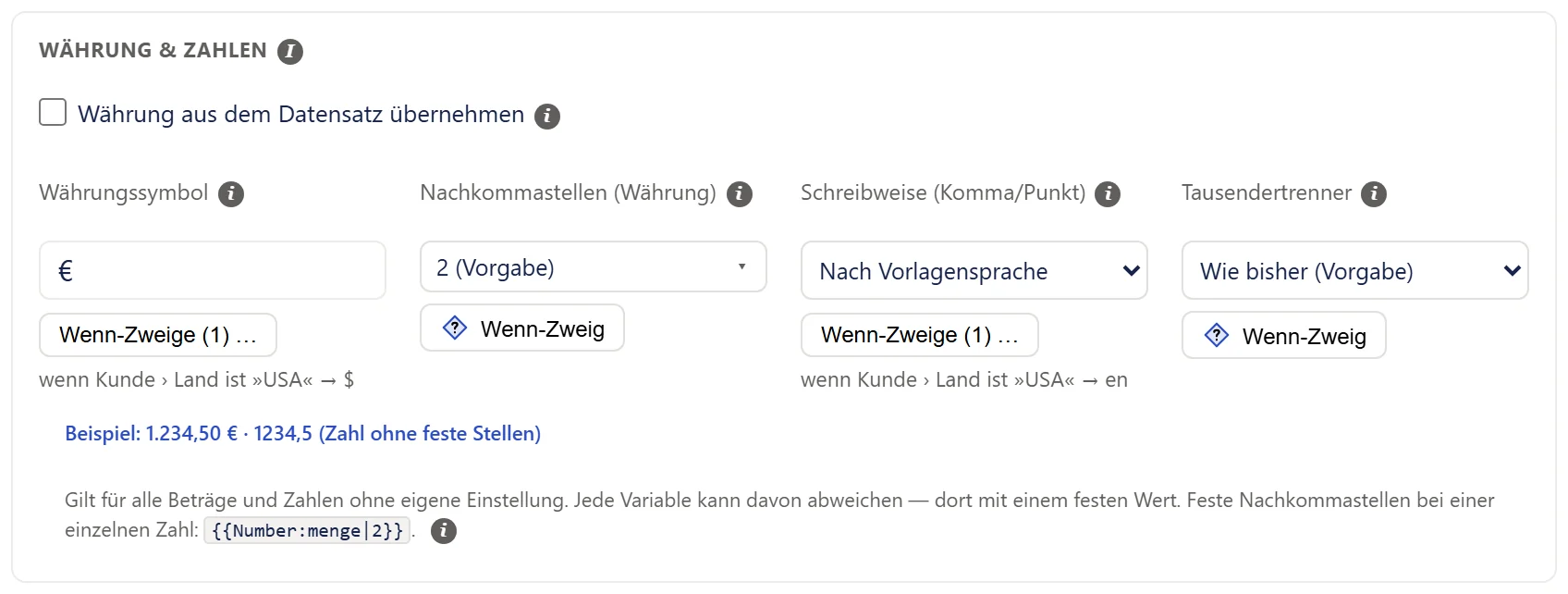
The “Währung & Zahlen” (currency & numbers) section of the template settings, in the German interface: currency symbol €, with an if branch for customers in the USA to $, decimal places, notation by template language and thousands separator.

Images from the record

Product photos straight from Dynamics, with fitting and cropping; the logo can switch by condition.

Texts in versions

One text in several variants. The first one whose condition is met gets printed.

Flowing or fixed

When a table grows, the objects below it move down and keep their spacing.

Header and footer of your choice

You decide on which pages they appear, for example only on the following pages.

Formulas

Mathematical formulas in the text, written in LaTeX, for example for technical data sheets.

Your house font

You upload custom fonts once; the font Arimo is already included.

From test to production

Export templates as a file and import them in another environment.

German and English

The designer speaks both languages. Each user picks their own.

Barcode, QR code and GiroCode

Barcode, QR code or the GiroCode for SEPA transfers, filled from a field or from fixed text.

More tables as sources

Alongside the main source, you bring in whole tables, for example the list of currencies.

Documents from your own code

One call, one document: from a plugin, JavaScript, Power Automate or the Web API.

Your own e-invoice standards

If your recipient requires a variation, you upload a standard of your own. If you like, the AI writes it.

The linked tiles open the manual, which is available in German only.

From within Dynamics

One click on the record, and the document is there.

Your users don’t need the designer. They click a button in Dynamics, and the document is created from the saved template and the record they are working on. In the form, in the list, or in a list in the middle of a form.

  • Show document The PDF opens in a new tab. Nothing is stored in Dynamics.
  • Prepare email A draft with the document attached. You review it and send it yourself.
  • Send email immediately Without confirmation, to a recipient from the record, for example the customer.

In a list, the button works through all ticked records one after another. After that, a flow in Power Automate can take over, for example filing the document in SharePoint or starting an approval.

Buttons in the manual (German) Flows in the manual (German)
The command bar of an invoice form in Dynamics with the “Create PDF” button next to “Save”.
The finished button in the command bar. You choose its label and icon yourself.
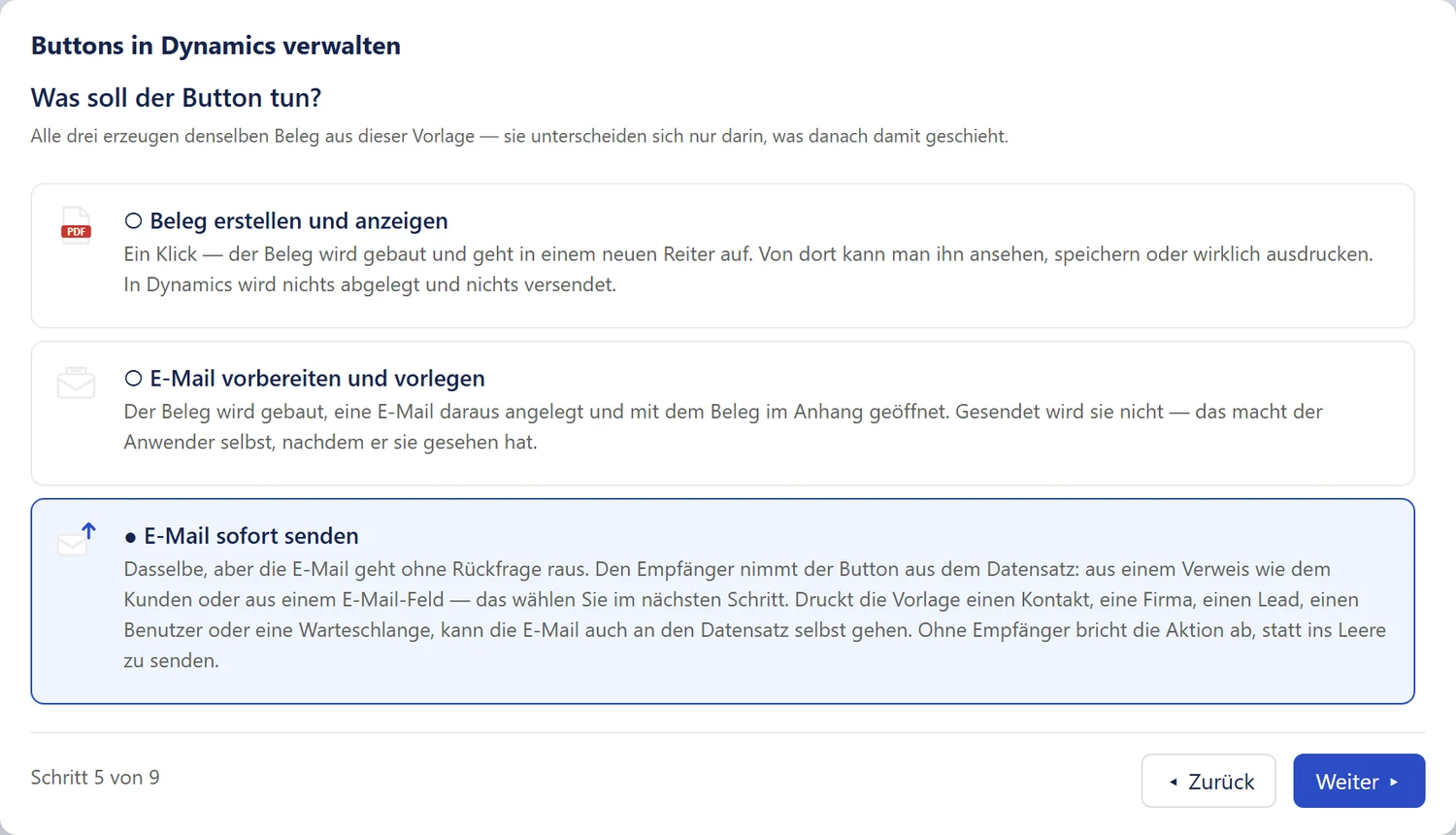
The “Buttons in Dynamics verwalten” (manage buttons in Dynamics) wizard in the German interface, step 5 of 9: what should the button do? Create and display the document, prepare an email and present it, send email immediately.
The wizard asks step by step and has every value ready to copy for the command designer of Power Apps.
Security and operation

Your documents don’t leave your environment.

Smart Templates comes as a solution for Dynamics 365. Designer, PDF generation and templates live in your own environment. There is no server for you to run and no service a document could be sent to. Only the license check contacts us, with identifiers and without contents.

Where your documents are created Inside your Dynamics 365 environment are the designer, your data, PDF generation as a plugin, templates, images and fonts. The finished document goes to the browser or into an email. There is no external document service. YOUR DYNAMICS 365 ENVIRONMENT Designer App “Smart Templates” in the browser Your data Quotes, invoices, customers, line items PDF generation Plugin in your Dataverse environment: layout, font measuring, PDF Templates with images and fonts Document in the browser or in the email External document service doesn’t exist
  • No external server for your documents Layout, font measuring and PDF are created in the plugin of your Dataverse environment. No Azure service, no hosting, no running costs.
  • Nothing is stored The document opens in the browser or is attached to the email. A copy is only created if a flow deliberately files it.
  • One role for everyone who designs Whoever designs templates gets the role “Smart Templates Designer”. Whoever only prints documents doesn’t need a role of their own.
  • For Dynamics 365 CE in the cloud Dynamics 365 Customer Engagement (CRM) or any other environment with Dataverse online. Installation on your own servers is not supported.
  • The license check only reports identifiers The plugin asks the Smart Templates license service for your key and for news: when someone opens the designer (at most once a day per browser), on the “License & updates” page, in the background when a new key is due, and when otherwise no document could be created. Only technical details are transmitted, such as the identifier of your organization (tenant ID) and of the environment, the installed version, the language and the number of your key. No documents, no templates, no records, no names. As long as a valid key is stored, Smart Templates prints without waiting for the service. All details are in the privacy policy.
<1s

is how long a typical document takes. Smart Templates keeps its templates warm by itself.

0

servers for you to run, pay for or secure.

4

setup steps: import the solution, assign the role, upload the logo, open the designer.

2

languages in the designer, German and English. You write your documents in any language.

The AI assistant, if you set it up, runs in Microsoft 365 Copilot, and flows run in your Power Automate. You upload your logo and custom fonts once during setup. Setup overview in the manual (German)

Pricing

Printing without a meter.

The price depends neither on your users nor on your documents. You only choose how to pay for Smart Templates: buy once, with or without a maintenance contract, or as an annual subscription.

Documents

No counting, no quota, no surcharge at month-end closing.

Users

Everyone prints. Whoever designs gets a role.

Templates

For every table, every language and every occasion.

Purchase + maintenance contract

Recommended

€2,950one-time

You buy Smart Templates once, use it indefinitely and keep it up to date with the maintenance contract.

  • It’s yours: usable indefinitely, a one-time purchase
  • First year included: new versions and support
  • New versions without interruption for as long as the maintenance contract runs
Maintenance contract €359 / year

Billed from the second year only. Cancel at any time, effective at the end of the paid year. Your version keeps printing indefinitely afterward.

Request a quote

Purchase

Pay once

€2,950one-time

You buy Smart Templates once and use it indefinitely, with no ongoing costs.

  • It’s yours: usable indefinitely
  • First year included: new versions and support
  • Afterward your version keeps printing unchanged, even without a maintenance contract
Maintenance contract, optional €359 / year

Possible at any time later, for new versions after the first year. You keep the price from the day of purchase if you sign up by the end of the first year.

Request a quote

Subscription

Low-cost start

€990per year

Everything included for as long as the subscription runs.

  • All features and all new versions
  • Adaptation to Dynamics 365 updates
  • Support by email
  • One-year term, then cancellable every year
  • Switch to a purchase at any time: the unused part of the subscription is credited
Request a quote
Included in all
  • Unlimited documents, users and templates
  • E-invoicing: XRechnung, ZUGFeRD, Factur-X
  • Buttons, email, flows and AI integration
  • All environments of your tenant: production, test, development
  • The complete manual (in German)
How to buy

You buy in Dynamics, not on this page: in the “Smart Templates” app, administrators choose their offer under “License & updates” and pay via Stripe, on request also by invoice. The key arrives by itself, at the next print or when the designer is opened. If you need a quote first, request it here.

All prices are net, plus VAT, per Azure tenant. All Dynamics environments in this tenant are included. The offer is aimed at businesses only. The price of a running contract stays the same as long as it runs without interruption; price changes apply to new contracts. The license terms apply (the contract language is German; the English text is a convenience translation).

What pays off over the years

The options cost different amounts at first and converge over time. Move the pointer over the chart to see the totals per year. If you only buy, you get no new versions after the first year.

  • Years 1–2The subscription is the cheapest start.
  • from year 3Purchase without a maintenance contract costs less than the subscription.
  • from year 5Purchase + maintenance contract also costs less than the subscription.

Costs added up, net

  • Subscription
  • Purchase + maintenance
  • Purchase, no maintenance
As a table
afterSubscriptionPurchase + maintenancePurchase, no maintenance
1 year€990€2,950€2,950
2 years€1,980€3,309€2,950
3 years€2,970€3,668€2,950
4 years€3,960€4,027€2,950
5 years€4,950€4,386€2,950
6 years€5,940€4,745€2,950
7 years€6,930€5,104€2,950
Frequently asked questions

What prospects want to know first.

Do we need a server of our own or an Azure service?

No. The designer runs as an app in Dynamics 365, PDF generation as a plugin in your Dataverse environment. There is nothing to host and there are no running costs.

The only thing to do once: you upload your logo and any custom fonts during setup.

Does our data leave the environment?

Documents, templates and records don’t. They are created and stored in your environment and are not filed anywhere; only the email functions attach the document to the email.

The only connection to us is the license check: the plugin reports technical details to the Smart Templates license service, among them the identifier of your organization and of the environment, the version, the language and the number of your key, and receives your key and news in return. Contents are not part of it. Exactly which details these are is stated in the privacy policy. For this, Dynamics must be allowed to open outbound connections; where your policies forbid that, you insert the key by hand.

An AI is optional: if you set up the AI assistant, it runs in Microsoft 365 Copilot and reads with the user’s permissions. With the AI package, you decide yourself what an external AI gets to see.

Is there a limit on documents, users or templates?

No. No documents and no users are counted. You create as many documents as your business needs, with as many users and templates as you like.

Technical limits exist only within a single operation: a document reads at most 20,000 rows per query and reports it when that limit is reached. A button displays up to 200 ticked records at once; this limit does not apply to emails.

What is the difference between purchase and subscription?

In features, none. With the subscription you pay €990 per year, with new versions and support included. With the purchase you pay €2,950 once and use Smart Templates indefinitely. In the first year, new versions and support are included. After that you get new versions only with the maintenance contract at €359 per year, which you can cancel at any time.

If you decide to buy, you can add the maintenance contract right away: it is only billed from the second year. All prices are net, plus VAT.

How does buying work?

You buy in Dynamics, not on this website. An administrator opens the “License & updates” page in the “Smart Templates” app, chooses the offer and pays on Stripe’s payment page. The key then arrives by itself, at the next print or when the designer is opened. With direct debit and, where we offer payment by invoice, also with payment by invoice, Smart Templates prints with a provisional key until the payment is confirmed.

You manage payment methods, invoices and cancellation in Stripe’s customer portal. If you need a quote first, request it here.

What happens without a maintenance contract?

Your purchased version keeps printing unchanged, with all templates and no limit on documents. Whatever was released up to the end of your updates, you may keep installing. New versions after that are only available with a maintenance contract, which you can take out later at any time.

Microsoft updates Dynamics 365 regularly. With a maintenance contract, we adapt Smart Templates to these updates.

What happens when the subscription ends or the trial expires?

Then no documents are created any more. Your templates, images and buttons are fully preserved, and Smart Templates prints again immediately as soon as you subscribe or buy.

Can we switch from the subscription to a purchase?

Yes, at any time. The subscription then ends immediately, and the unused portion is credited toward the purchase price.

Which Dynamics environments are supported?

We mean Dynamics 365 Customer Engagement (CE), i.e. the CRM: Sales, Customer Service and any other environment with Dataverse in the cloud. Business Central and Finance & Operations are separate systems and are not supported. A template can print from any table: quote, order, invoice, company, contact or your own tables. Installation on your own servers (on-premises) is not supported.

Do test and development environments need a license of their own?

No. One license covers your whole Azure tenant, with all the Dynamics environments in it: production, test and development.

How do we get the trial?

Via the “Request a trial” form. We get in touch with you personally and send you the solution “SmartTemplates”, which you import into Power Apps. The trial runs for 30 days with all features. The 30 days begin when the designer is first opened and apply to all environments of your tenant. After that, no documents are created until you subscribe or buy.

How setup works is described in the manual under Setup overview (German).

How much effort is the setup?

You import the solution “SmartTemplates” into Power Apps, assign the role “Smart Templates Designer” to everyone who designs templates, and upload your logo. Keeping the templates warm sets itself up.

You set up buttons, flows and the AI assistant when you need them. It’s best to start in a test environment.

Do we need Microsoft 365 Copilot or Power Automate?

No, both are optional. The AI assistant requires Microsoft 365 Copilot, with a license or Copilot credits. Without Copilot you work with the AI package and an AI chat of your choice.

Flows run in Power Automate. Whoever creates a flow needs a license that allows Dataverse in flows, such as a Dynamics 365 license.

How fast is a document created?

A typical document is created in under a second. It takes longer with many images from the data, for example a product photo in original size on every line item. After a longer pause, the first document would take ten to seventeen seconds; that is why Smart Templates keeps its templates warm by itself.

Can we send documents by email?

Yes. A button puts the document into an email draft that you see before sending, or sends it immediately to a recipient from the record, such as the customer. This also works for many ticked records at once.

In which languages?

The designer is available in German and English; each user chooses their own. You write your documents in any language. Date, numbers and currency follow the template language.

Does Smart Templates also create e-invoices?

Yes. ZUGFeRD and Factur-X as a PDF with an embedded XML file, XRechnung as a pure XML file. This applies to invoices, partial and final invoices, cancellation invoices and credit notes.

Smart Templates checks mandatory fields and amounts before the document is created. You assign the totals and taxes of the XML from your template, usually from the same fields as in the print; the standard’s arithmetic check verifies that the amounts add up. More in the manual under E-invoicing (German).

Can we keep using our existing Word templates?

As a starting point, yes. Give your AI chat the Word template together with the AI package from the designer. It builds a template for Smart Templates from it, which you open via “Import” and fine-tune.

Trial

Try it for 30 days, in your own environment.

Fill in the form. We get in touch with you personally and send you the solution “SmartTemplates”. You import it into Power Apps and get started, with all features.

  1. Send the formName, company, position, email
  2. We get in touchpersonally, with the solution “SmartTemplates”
  3. Importinto Power Apps, like any solution

It’s best to install the trial in a test environment first. The 30 days begin when the designer is first opened. After that, no documents are created until you subscribe or buy.

Rather ask first?

Describe a document the way it looks today, for example a quote or an invoice, and ask us how it would work with Smart Templates. We answer by email.

Ask a question

Or request a quote or report a bug.