The maintenance contract
In short
With the maintenance contract, you get new versions, adaptation to changes by Microsoft, and support for your purchased license after the first year as well. It costs €359 per year (net) and is optional. The easiest way is to choose it right at the purchase; it is then charged only from the second year. Without a maintenance contract, your purchased version keeps printing perpetually; what then no longer belongs to it is described under Without a maintenance contract.
What maintenance covers
- Updates: all new versions that we release generally. We decide what an update contains; there is no entitlement to particular new features (§ 8).
- Adaptation to Microsoft: If Microsoft changes the platform so that Smart Templates no longer works as described, we adapt it within a reasonable period, as far as technically possible.
- Support: We accept reports of errors, examine them and fix confirmed errors, usually with an update. Support is available in German and English, in English in writing only. There are no fixed response times. Questions about operation and about designing templates are not included; this manual answers them (§ 9).
With a subscription, maintenance is always included. A maintenance contract therefore exists only for a purchased license.
The first year is included in the purchase price
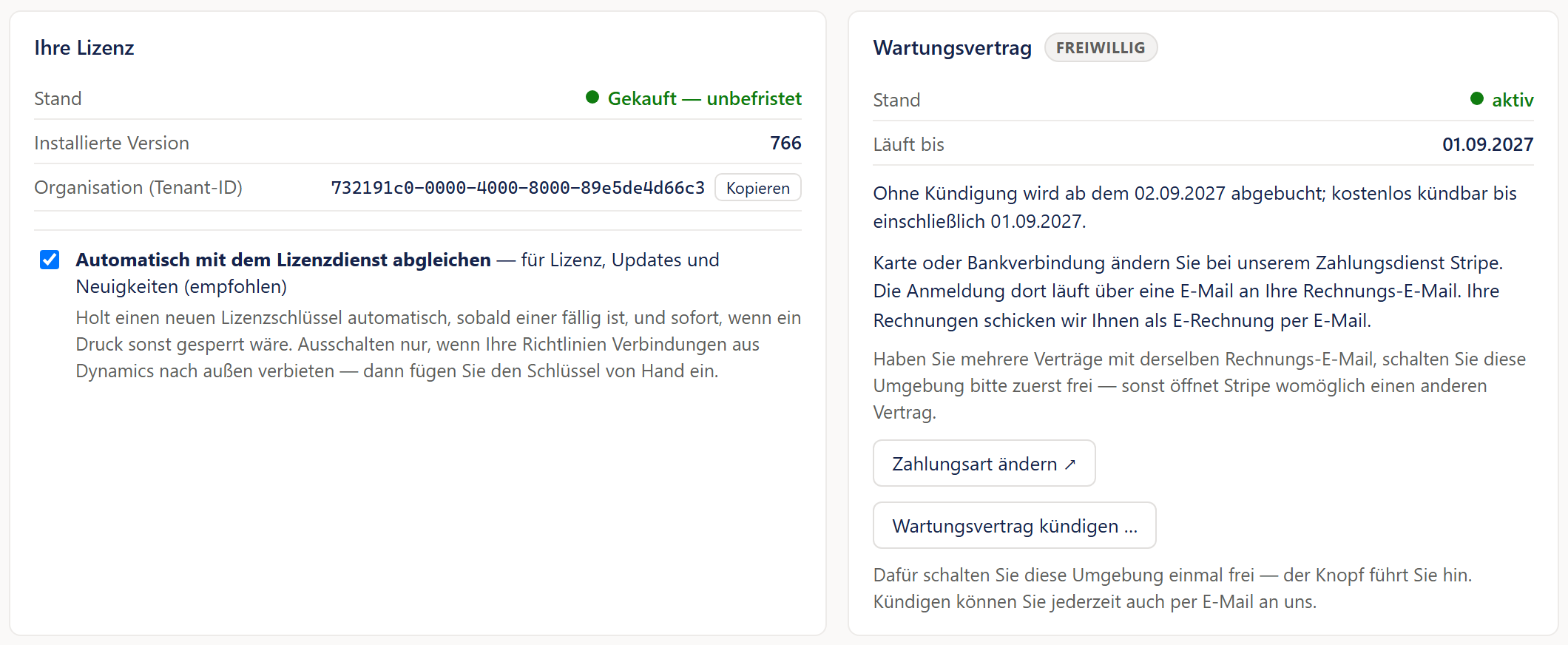
With a purchase, maintenance for the first twelve months is included. The first year ends on the anniversary of the purchase: if you buy on June 1, 2027, maintenance is included up to and including June 1, 2028. You see the day on “License & updates”: after a purchase without maintenance contract in the row “Updates included until”, after a purchase with maintenance contract in the card “Maintenance contract” under “Runs until”, together with the sentence “… you can cancel free of charge up to and including …”.
Taking it out right at purchase
On “License & updates”, choose the button “Buy with maintenance contract”. You then pay in a single payment process:
- Today: the purchase price of €2,950 (net).
- On the day after the anniversary: for the first time the maintenance contract, €359 (net) for one year. For a purchase on June 1, 2027, that is June 2, 2028. You don’t need to do anything for this; it is charged via the payment method you gave at the purchase.
- After that: every year on the same day, until you cancel.
In the first year, the card “Maintenance contract” on “License & updates” says: “Unless you cancel, billing starts on 02.06.2028; you can cancel free of charge up to and including 01.06.2028.” About 30 days before the first charge, we also send you an email with the subject “Smart Templates: your maintenance contract starts on …”. It names the day of the charge, the amount and the last day on which you can still cancel free of charge.
Good to know
Stripe calls the first year of the maintenance contract, which is included in the purchase price, a “free trial” on the payment page, on the invoice and in the customer portal, and counts the free days on the payment page. This is fixed text from Stripe. No test is meant: it is the first year of maintenance that you have already paid for with the purchase price. In Stripe your contract is called “Smart Templates – Wartungsvertrag / Maintenance contract”. On the purchase invoice there is the note “Maintenance in the first year is included in the purchase price; the maintenance contract is billed annually from …” with the day of the first charge, and on the annual invoices after that “Maintenance contract for the perpetual license; the first year was included in the purchase price.”
Taking it out later
You can also take out the maintenance contract after the purchase, with “Take out maintenance contract …” on “License & updates” (§ 4(2)): in the first year in the card “Maintenance contract”, after that in the card “Updates”. We then send the payment link to your invoice email, see If you are already a customer.
- Taken out in the first year: The maintenance contract normally begins at the end of the first year and is charged only then. You pay the maintenance price that was valid on the day of your purchase; the page names the last day for this. About 30 days before the end of the first year, we remind you with an email “Smart Templates: your maintenance ends on …” if you bought via the payment page and do not have a maintenance contract yet; if we set up your purchase for you by hand, this email does not come. The first invoice of the maintenance contract (€0, at the conclusion) says “Maintenance in the first year is included in the purchase price; the maintenance contract is billed annually from …”, the annual invoices say “Maintenance contract for the perpetual license; the first year was included in the purchase price.”
- Taken out in the last three days of the first year: If you request the payment link only that late, the maintenance contract begins with the conclusion, and Stripe charges the first year immediately. There is then no €0 invoice. If you want to avoid that, take it out earlier.
- Taken out after the first year: The maintenance contract begins with the conclusion. The price valid at that time applies (§ 4(5)).
- Back-billing: If you take it out only after the first year, or resume maintenance after a cancellation, we may bill the time without maintenance retroactively, for two years at most and at the price valid at that time at most. We tell you about any back-billing before the conclusion; if we name none, it does not apply (§ 5(3)).
Renewal and price
The maintenance contract runs for twelve months and renews by twelve months each time (§ 5(2)). It is charged annually in advance. Your price stays the same as long as the contract runs without interruption. New prices apply only to new contracts (§ 4(5)).
If a renewal cannot be charged, you receive a reminder by email. Your purchased version keeps printing; until the payment arrives, there are just no new versions (§ 4(7)). More on this under If maintenance has not been paid.
Canceling
You cancel the maintenance contract at any time, effective at the end of the current term: on “License & updates” with “Cancel maintenance contract …” in the card “Maintenance contract”, or by email. Until the end of the term you can withdraw the cancellation there with “Withdraw cancellation …”. In a verified environment, the card also shows whether your maintenance contract is canceled: “Canceled as of …”. How this works is described under Canceling the maintenance contract.
Caution
If you chose the maintenance contract at the purchase and do not want it after all, cancel it on the anniversary of your purchase at the latest. Nothing is charged then (§ 5(2)). In the years after that, cancel on the day before the date that “License & updates” names in the card “Maintenance contract” under “Runs until” at the latest. If a contract year has already been charged, the contract runs until the end of that year, and the annual amount is not refunded pro rata (§ 5(8)).
Without a maintenance contract
Your purchased license stays perpetual. Without maintenance, the following applies (§ 8(5)):
- You may use all versions released up to the end of your maintenance perpetually and may still install them.
- Versions released after that do not create documents without a maintenance contract.
- You no longer get support, and we no longer adapt older versions to changes by Microsoft. If Microsoft changes the platform, an older version may therefore at some point no longer work as described.
On “License & updates”, the row “Updates” then says “ended on …”, and the card “Updates” offers the maintenance contract. If you take out a maintenance contract later, a newer version prints as well as soon as the payment is confirmed. How to check whether a version is covered by your license is described under Updates and new versions.