
Actions and APIs
In short
One call, one document: st_GenerateDocument creates the PDF from a template and a record and returns it as Base64. You call the action from a plugin, from JavaScript, from Power Automate or through the web API; the examples on this page are available in C#, JavaScript and HTTP to copy. Three actions create a document, three serve the e-invoice, one keeps printing fast, two serve the AI assistant. All of them are unbound, visible to everyone and have no security privilege of their own; inputs and outputs are text, only st_CheckKeepWarm returns Ok as yes/no.
A PDF in one call
POST /api/data/v9.2/st_GenerateDocument
Action · unbound · no privilege of its own · Inputs and outputs: text
You name the template and the record and get the PDF back. That is all it takes:
using System;
using Microsoft.Xrm.Sdk;

public sealed class GenerateDocumentPlugin : IPlugin
{
    public void Execute(IServiceProvider serviceProvider)
    {
        var context = (IPluginExecutionContext)serviceProvider.GetService(typeof(IPluginExecutionContext));
        var service = ((IOrganizationServiceFactory)serviceProvider.GetService(typeof(IOrganizationServiceFactory)))
            .CreateOrganizationService(context.UserId);

        var response = service.Execute(new OrganizationRequest("st_GenerateDocument")
        {
            ["TemplateId"]    = "3f6b2c1e-8a4d-4f7b-9c2e-1d5a7b9e0c42",   // template id
            ["PrimaryEntity"] = context.PrimaryEntityName,                 // e.g. "invoice"
            ["PrimaryId"]     = context.PrimaryEntityId.ToString(),
            ["Mode"]          = "pdf",
            ["FlowId"]        = null                                       // optional: a Power Automate cloud flow to start afterwards
        });

        var pdfBase64 = (string)response["PdfBase64"];   // the PDF as Base64
        var message   = (string)response["Message"];     // warnings start with "WARNING:"
    }
}// In a form script or a command bar button
async function generateDocument(formContext) {
const response = await Xrm.WebApi.online.execute({
TemplateId: "3f6b2c1e-8a4d-4f7b-9c2e-1d5a7b9e0c42", // template id
PrimaryEntity: formContext.data.entity.getEntityName(), // e.g. "invoice"
PrimaryId: formContext.data.entity.getId().replace(/[{}]/g, ""),
Mode: "pdf",
FlowId: null, // optional: a Power Automate cloud flow to start afterwards
getMetadata: () => ({
boundParameter: null,
operationType: 0, // 0 = action
operationName: "st_GenerateDocument",
parameterTypes: {
TemplateId: { typeName: "Edm.String", structuralProperty: 1 },
PrimaryEntity: { typeName: "Edm.String", structuralProperty: 1 },
PrimaryId: { typeName: "Edm.String", structuralProperty: 1 },
Mode: { typeName: "Edm.String", structuralProperty: 1 },
FlowId: { typeName: "Edm.String", structuralProperty: 1 }
}
})
});
return await response.json(); // .PdfBase64 and .Message
}POST https://contoso.crm4.dynamics.com/api/data/v9.2/st_GenerateDocument HTTP/1.1
Authorization: Bearer <Token>
Content-Type: application/json; charset=utf-8
Accept: application/json
OData-MaxVersion: 4.0
OData-Version: 4.0
{
"TemplateId": "3f6b2c1e-8a4d-4f7b-9c2e-1d5a7b9e0c42",
"PrimaryEntity": "invoice",
"PrimaryId": "9d4e2b7a-1c3f-4e8d-b2a6-5f7c9e1d3b80",
"Mode": "pdf",
"FlowId": null
}Instead of the ID, you can also pass the template as JSON (TemplateJson); that is how the designer works. With the input FlowId, the same action starts a flow in Power Automate after the document; in the example it is null, so there is no flow (see Starting a flow). All inputs and outputs are listed under st_GenerateDocument: all inputs and outputs.
Without code
The same as a button in the Dynamics command bar, without a line of your own code: in the designer, the assistant “Manage buttons in Dynamics” creates the button, purpose “Create and display the document”. One click builds the document and opens it in a new tab. The button calls SmartTemplates.Button.showDocument from st_button.js, and for all checked rows of a list SmartTemplates.Button.showDocumentAll. Here is how: Buttons: the assistant: What should the button do? and Adding, changing and removing a button.
What comes back
This is what the response looks like, shortened:
{
  "@odata.context": "https://contoso.crm4.dynamics.com/api/data/v9.2/$metadata#Microsoft.Dynamics.CRM.st_GenerateDocumentResponse",
  "PdfBase64": "JVBERi0x…",
  "Message": "OK: 2 page(s), 103912 bytes [Server-Daten] · Data: 1 query, 9 column(s), 852 ms · …",
  "LayoutJson": "",
  "ChoicesJson": "",
  "FlowRunId": "",
  "TriggerRowId": ""
}PdfBase64: the PDF as Base64. It begins withJVBERi0x, that is,%PDF-1.FileName: the name of the PDF, for exampleRechnung_R-2026-0042.pdf(see Outputs).Message: on success it begins withOK:and names pages, size and times. Warnings begin withWARNING:(see Errors and warnings).- The other fields stay empty as long as you do not use a different
Mode, choices or a flow. If the template has an e-invoice “XML only”,XmlBase64andXmlFileNameare added (see E-invoice).
The actions at a glance
| Action | What it does |
|---|---|
st_GenerateDocument | Creates the document for a record and returns the PDF. |
st_CreateEmail | Creates the document and creates an email draft with the PDF as an attachment. Does not send. |
st_SendEmail | Creates the document and sends the email with the attachment immediately. |
st_GenerateEInvoice | Creates the e-invoice of a record only as an XML file, with ZUGFeRD the factur-x.xml. Without PDF, without flow. See E-invoice. |
st_StandardLesen | Reads the standards of the e-invoice: the list, the overview of a standard, its files, the suggestions for the Dynamics invoice and the description of the format. |
st_StandardHochladen | Checks a custom standard and stores it in the table of custom standards. |
st_CheckKeepWarm | Checks and repairs keeping warm. No inputs, prints nothing. Outputs: Ok (yes/no) and Message (plain text). |
st_FormatLesen | Returns the description of the template format in parts, for the AI assistant. |
st_VorlageAendern | Accepts a change to a template, checks it and stores it as an AI change. The saved template stays unchanged. |
All three print actions can start a flow in Power Automate after the document (input FlowId). st_GenerateEInvoice does not have this input.
Showing the PDF in the browser
In a command bar button, you show the document in a new tab. The order is what matters: first open the tab, then wait for the document.
// In a button click: open the tab FIRST, then wait for the document.
// After an await, the browser silently blocks a new window.
async function showDocument(formContext) {
  const tab = window.open("", "_blank");
  try {
    const result = await generateDocument(formContext);           // from the first example
    const raw = atob(result.PdfBase64);
    const bytes = new Uint8Array(raw.length);
    for (let i = 0; i < raw.length; i++) bytes[i] = raw.charCodeAt(i);
    tab.location.href = URL.createObjectURL(new Blob([bytes], { type: "application/pdf" }));
  } catch (error) {
    if (tab) tab.close();
    Xrm.Navigation.openAlertDialog({ text: "No document: " + error.message });
  }
}
Ready-built, Smart Templates delivers this with the library st_button.js, including a wait notice, messages and several records at once (see From a button in Dynamics).
The document by email
The document arrives as a PDF attachment on an email whose subject and text come from a Dynamics email template. How to create an email template is described in Microsoft: Create templates for emails. There are three ways:
| Way | What happens | Good for |
|---|---|---|
st_CreateEmail | One call: create the document, create an email draft from the email template, attach the PDF. Nothing is sent. | The user checks the email and sends it themselves. |
st_SendEmail | The same, and the email goes out immediately. | Emails without review. |
| Built yourself | Create the document, fill the email template with InstantiateTemplate, create the email, attach the PDF, send if desired. | Your own recipients, your own text, further attachments. |
The input FlowId also exists for st_CreateEmail and st_SendEmail; it then starts a flow and sends nothing itself (see Starting a flow).
One call: st_CreateEmail
st_CreateEmail creates the document, creates an email draft from the email template (EmailTemplateId) and attaches the PDF. Nothing is sent: the draft is in Dynamics, and the user checks it and sends it themselves. The attachments of the email template come along as a copy.
var response = service.Execute(new OrganizationRequest("st_CreateEmail")   // creates a draft, nothing is sent
{
    ["TemplateId"]      = "3f6b2c1e-8a4d-4f7b-9c2e-1d5a7b9e0c42",   // document template
    ["EmailTemplateId"] = "7a1d9c3e-5b2f-4d8a-9e6c-2b4f8d1a7c35",   // email template: subject and text
    ["PrimaryEntity"]   = "invoice",
    ["PrimaryId"]       = context.PrimaryEntityId.ToString(),
    ["To"]              = "contact:" + contactId                   // optional
});

var emailId = (string)response["EmailId"];   // the draft with the PDF attached
var message = (string)response["Message"]; // skipped recipients appear here as "WARNING:"const response = await Xrm.WebApi.online.execute({
TemplateId: "3f6b2c1e-8a4d-4f7b-9c2e-1d5a7b9e0c42", // document template
EmailTemplateId: "7a1d9c3e-5b2f-4d8a-9e6c-2b4f8d1a7c35", // email template: subject and text
PrimaryEntity: "invoice",
PrimaryId: id,
To: "contact:" + contactId, // optional
getMetadata: () => ({
boundParameter: null,
operationType: 0, // 0 = action
operationName: "st_CreateEmail", // creates a draft, nothing is sent
parameterTypes: {
TemplateId: { typeName: "Edm.String", structuralProperty: 1 },
EmailTemplateId: { typeName: "Edm.String", structuralProperty: 1 },
PrimaryEntity: { typeName: "Edm.String", structuralProperty: 1 },
PrimaryId: { typeName: "Edm.String", structuralProperty: 1 },
To: { typeName: "Edm.String", structuralProperty: 1 }
}
})
});
const { EmailId, Message } = await response.json();
await Xrm.Navigation.openForm({ entityName: "email", entityId: EmailId }); // open the draft### Creates a draft with the PDF attached; nothing is sent
POST https://contoso.crm4.dynamics.com/api/data/v9.2/st_CreateEmail HTTP/1.1
Authorization: Bearer <Token>
Content-Type: application/json; charset=utf-8
Accept: application/json
OData-MaxVersion: 4.0
OData-Version: 4.0
{
"TemplateId": "3f6b2c1e-8a4d-4f7b-9c2e-1d5a7b9e0c42",
"EmailTemplateId": "7a1d9c3e-5b2f-4d8a-9e6c-2b4f8d1a7c35",
"PrimaryEntity": "invoice",
"PrimaryId": "9d4e2b7a-1c3f-4e8d-b2a6-5f7c9e1d3b80",
"To": "contact:5c8e1f2a-7b3d-4a9c-8e1f-3d6b9a2c4e71"
}Without code
As a button without code of your own: purpose “Prepare an email and present it” in the assistant “Manage buttons in Dynamics”. One click creates the draft with the document attached and opens it; nothing is sent. You choose a recipient from the record in the step “Who receives the email?”; the button passes it along as To. If the field yields nothing, the same applies as without this choice (see Recipients and Buttons: the assistant: Who receives the email?). The button calls SmartTemplates.Button.openEmail, for all checked rows SmartTemplates.Button.openEmailAll. You choose the email template in the assistant either fixed or depending on a condition (see Buttons: the assistant: Email template: always the same or depending on a condition). Here is how: Buttons: the assistant: What should the button do? and Adding, changing and removing a button.
st_SendEmail has the same inputs and outputs and sends the email immediately; without a recipient it aborts (see Recipients).
Without code
As a button without code of your own: purpose “Send email immediately” in the assistant “Manage buttons in Dynamics”. The button calls SmartTemplates.Button.sendEmail, for all checked rows SmartTemplates.Button.sendEmailAll. You choose the recipient in the step “Who receives the email?”, from a lookup or an email field of the record; the button passes it along as To (see Buttons: the assistant: Who receives the email?). If the field is empty on a record, the button sends nothing for it and says so. Without this choice the email goes to the record itself, and without a recipient the action aborts. Here is how: Buttons: the assistant: What should the button do? and Adding, changing and removing a button.
Built yourself: fill the email template and attach the PDF
If you want to determine recipients, text or further attachments yourself, assemble the email yourself with the Dynamics actions. InstantiateTemplate fills the email template for the record without creating anything; after that you create the email and attach the PDF as activitymimeattachment. The email template must be built for the table of the record or be of the type “User”.
using Microsoft.Crm.Sdk.Messages;   // InstantiateTemplateRequest, SendEmailRequest

// 1. Fill the email template for this record (creates nothing yet)
var instantiated = (InstantiateTemplateResponse)service.Execute(new InstantiateTemplateRequest
{
    TemplateId = new Guid("7a1d9c3e-5b2f-4d8a-9e6c-2b4f8d1a7c35"),   // email template id
    ObjectType = context.PrimaryEntityName,                          // e.g. "invoice"
    ObjectId   = context.PrimaryEntityId
});

// 2. Create the email with subject and text from the template
var email = instantiated.EntityCollection.Entities[0];
email["regardingobjectid"] = new EntityReference(context.PrimaryEntityName, context.PrimaryEntityId);
email["to"] = new EntityCollection(new[]
{
    new Entity("activityparty") { ["partyid"] = new EntityReference("contact", contactId) }
});
var emailId = service.Create(email);

// 3. Attach the PDF from the first example
service.Create(new Entity("activitymimeattachment")
{
    ["objectid"]       = new EntityReference("email", emailId),
    ["objecttypecode"] = "email",
    ["filename"]       = "Invoice.pdf",
    ["mimetype"]       = "application/pdf",
    ["body"]           = pdfBase64
});

// 4. Optional: send it right away
service.Execute(new SendEmailRequest { EmailId = emailId, IssueSend = true, TrackingToken = "" });const id = formContext.data.entity.getId().replace(/[{}]/g, "");
// 1. Fill the email template for this record (creates nothing yet)
const response = await Xrm.WebApi.online.execute({
TemplateId: { guid: "7a1d9c3e-5b2f-4d8a-9e6c-2b4f8d1a7c35" }, // email template id; Edm.Guid needs { guid }
ObjectType: "invoice",
ObjectId: { guid: id },
getMetadata: () => ({
boundParameter: null,
operationType: 0, // 0 = action
operationName: "InstantiateTemplate",
parameterTypes: {
TemplateId: { typeName: "Edm.Guid", structuralProperty: 1 },
ObjectType: { typeName: "Edm.String", structuralProperty: 1 },
ObjectId: { typeName: "Edm.Guid", structuralProperty: 1 }
}
})
});
const template = (await response.json()).value[0];
// 2. Create the email with subject and text from the template
const email = await Xrm.WebApi.createRecord("email", {
subject: template.subject,
description: template.description,
"regardingobjectid_invoice_email@odata.bind": "/invoices(" + id + ")",
email_activity_parties: [
{ "partyid_contact@odata.bind": "/contacts(" + contactId + ")", participationtypemask: 2 } // 2 = To
]
});
// 3. Attach the PDF from the first example
const result = await generateDocument(formContext);
await Xrm.WebApi.createRecord("activitymimeattachment", {
"objectid_email@odata.bind": "/emails(" + email.id + ")",
objecttypecode: "email",
filename: "Invoice.pdf",
mimetype: "application/pdf",
body: result.PdfBase64
});### 1. Fill the email template for this record (creates nothing yet)
POST https://contoso.crm4.dynamics.com/api/data/v9.2/InstantiateTemplate HTTP/1.1
Authorization: Bearer <Token>
Content-Type: application/json; charset=utf-8
{
"TemplateId": "7a1d9c3e-5b2f-4d8a-9e6c-2b4f8d1a7c35",
"ObjectType": "invoice",
"ObjectId": "9d4e2b7a-1c3f-4e8d-b2a6-5f7c9e1d3b80"
}
### 2. Create the email with subject and text from step 1
POST https://contoso.crm4.dynamics.com/api/data/v9.2/emails HTTP/1.1
Authorization: Bearer <Token>
Content-Type: application/json; charset=utf-8
Prefer: return=representation
{
"subject": "<subject from step 1>",
"description": "<description from step 1>",
"regardingobjectid_invoice_email@odata.bind": "/invoices(9d4e2b7a-1c3f-4e8d-b2a6-5f7c9e1d3b80)",
"email_activity_parties": [
{ "partyid_contact@odata.bind": "/contacts(5c8e1f2a-7b3d-4a9c-8e1f-3d6b9a2c4e71)", "participationtypemask": 2 }
]
}
### 3. Attach the PDF
POST https://contoso.crm4.dynamics.com/api/data/v9.2/activitymimeattachments HTTP/1.1
Authorization: Bearer <Token>
Content-Type: application/json; charset=utf-8
{
"objectid_email@odata.bind": "/emails(<activityid from step 2>)",
"objecttypecode": "email",
"filename": "Invoice.pdf",
"mimetype": "application/pdf",
"body": "JVBERi0x…"
}More on this: Microsoft: The InstantiateTemplate action.
Inputs
| Name | Required | Meaning |
|---|---|---|
TemplateId | yes | The document template. |
EmailTemplateId | yes, unless the template chooses by itself | The email template (template): subject, text and its attachments. Its attachments come as a copy in every email. It must be built for the table from PrimaryEntity or be of the type “User”, otherwise the action aborts; this also applies to one chosen via wahlen. |
PrimaryEntity | yes | The table, for example invoice. |
PrimaryId | yes | The record. |
To | no | Recipients, see below. |
Cc | no | Copy, same notation as To. |
FlowId | no | Cloud flow that is to run afterwards. |
FileName | no | File name of the PDF attachment. Empty: the PDF name of the template (see Template settings: PDF name), without it the name of the document template. |
Trace | no | Is passed on to st_GenerateDocument. |
In Dataverse, all inputs are registered as optional, including the four required ones. If one is missing, the action answers with a sentence of its own that says what it is needed for.
Recipients
Separate several recipients with a semicolon or a line break, not with a comma. Each entry is one of three:
a1b2c3d4-1111-2222-3333-444444444444          an id; the table is looked up
contact:a1b2c3d4-1111-2222-3333-444444444444  an id with its table (faster, unambiguous)
anna.smith@example.com an email address- The search covers
contact,account,systemuser,queueandlead, in this order. An entry that is found nowhere is dropped with a warning inMessage. - A prefix belongs only in front of an ID. If it is in front of an address, the entry is dropped with a warning.
- If
Tois empty and the record itself can be addressed (one of the five tables that are searched; with their German names they are listed under Buttons: the assistant: What should the button do?), it is the recipient. Otherwise the draft is created without a recipient, andst_SendEmailaborts. Smart Templates does not guess a recipient. A button passesToalong if a recipient is set for it in the assistant (parameterto:…; see Buttons: the assistant: Who receives the email?).
Choosing the email template from the template
If the document template contains a section wahlen, if-then cases choose the email template, and EmailTemplateId may be omitted. If EmailTemplateId is set, it applies. In the designer, you build the cases in the assistant “Manage buttons in Dynamics”, in the step for the email template with “Depending on a condition” (see Buttons: the assistant: Depending on a condition: the cases).
"wahlen": {
  "mailvorlage": {
    "faelle": [ { "wenn": "ordertype == 'Project'", "dann": "<email template id>" } ],
    "sonst": "<email template id>"
  }
}
wenn is an expression in the same condition language as the visibility rules (Template format, section “Conditions”), evaluated on the main record. Which fields the assistant offers for this is described under Conditions: Where conditions occur.
Outputs
| Name | Meaning |
|---|---|
EmailId | The email that was created. |
PdfBase64 | The document, the same as in the attachment. |
FileName | The name of the PDF attachment. Empty if no PDF is attached (e-invoice “XML only” without a reading copy). |
FlowRunId, TriggerRowId | As with st_GenerateDocument. |
Message | Plain text. Recipients that were left out are listed here and only here, as WARNING:. |
Attachments with e-invoice
The email actions attach what the template is set to:
| Template setting | Attachments of the email |
|---|---|
| no e-invoice, switched off, or “Only if …” does not apply | The PDF, as before. |
| ZUGFeRD, “PDF with embedded e-invoice” | One attachment: the PDF/A-3 with the factur-x.xml in it. |
| “only the e-invoice (XML)” | The XML (application/xml, name from the standard, for example XRechnung_R-2026-0042.xml, or the PDF name of the template with .xml). |
| “only the e-invoice (XML)” with reading copy | The XML and the PDF. |
FileName still applies to the PDF; the XML keeps the name from the standard, or it is named like the PDF name of the template with .xml. If the e-invoice lacks a required detail or a check calculation does not match, no email is created: “The document could not be built: The e-invoice cannot be created – … — no email was created.”
Starting a flow
FlowId is the ID of a cloud flow, as it appears in the address bar of Power Automate after /flows/. Before the document, the action checks: Does the flow exist, is it a cloud flow, is it switched on, and does it match the record? If the check fails, nothing is created. The flow is started right at the end and asynchronously; the caller does not wait for the flow.
The call is the same as in the first example, only with an ID in FlowId. Nothing is sent in the process; the flow does what you build into it.
var response = service.Execute(new OrganizationRequest("st_GenerateDocument")
{
    ["TemplateId"]    = "3f6b2c1e-8a4d-4f7b-9c2e-1d5a7b9e0c42",
    ["PrimaryEntity"] = "invoice",
    ["PrimaryId"]     = context.PrimaryEntityId.ToString(),
    ["Mode"]          = "pdf",
    ["FlowId"]        = "b2e4c6a8-0d1f-4a3b-9c5e-7f8a1b2c3d4e"    // Power Automate cloud flow id (address bar, after /flows/)
});

var triggerRowId = (string)response["TriggerRowId"];   // set when the flow was started through the trigger table
var flowRunId    = (string)response["FlowRunId"];      // set when the flow was started directly
var message = (string)response["Message"]; // "WARNING: …" if the flow was not startedconst response = await Xrm.WebApi.online.execute({
TemplateId: "3f6b2c1e-8a4d-4f7b-9c2e-1d5a7b9e0c42",
PrimaryEntity: "invoice",
PrimaryId: id,
Mode: "pdf",
FlowId: "b2e4c6a8-0d1f-4a3b-9c5e-7f8a1b2c3d4e", // Power Automate cloud flow id (address bar, after /flows/)
getMetadata: () => ({
boundParameter: null,
operationType: 0, // 0 = action
operationName: "st_GenerateDocument",
parameterTypes: {
TemplateId: { typeName: "Edm.String", structuralProperty: 1 },
PrimaryEntity: { typeName: "Edm.String", structuralProperty: 1 },
PrimaryId: { typeName: "Edm.String", structuralProperty: 1 },
Mode: { typeName: "Edm.String", structuralProperty: 1 },
FlowId: { typeName: "Edm.String", structuralProperty: 1 }
}
})
});
const { TriggerRowId, FlowRunId, Message } = await response.json();POST https://contoso.crm4.dynamics.com/api/data/v9.2/st_GenerateDocument HTTP/1.1
Authorization: Bearer <Token>
Content-Type: application/json; charset=utf-8
Accept: application/json
OData-MaxVersion: 4.0
OData-Version: 4.0
{
"TemplateId": "3f6b2c1e-8a4d-4f7b-9c2e-1d5a7b9e0c42",
"PrimaryEntity": "invoice",
"PrimaryId": "9d4e2b7a-1c3f-4e8d-b2a6-5f7c9e1d3b80",
"Mode": "pdf",
"FlowId": "b2e4c6a8-0d1f-4a3b-9c5e-7f8a1b2c3d4e"
}Without code
The flow also works without code: in the assistant “Manage buttons in Dynamics”, you choose it in the step “Should a Power Automate flow run afterwards?”; the button then passes it along as FlowId (see Buttons: the assistant: The step “Should a Power Automate flow run afterwards?”).
- The recommended way: a flow with the trigger on the trigger table of Smart Templates. The action creates a row there with flow, template, table and record, with the email actions also with the email, and the flow starts. This is how the flow management in the designer creates it (button “↻ Manage flows”, see Flows: Managing flows; what the created flow already contains is described under Flows: The skeleton of the created flow). If you build it yourself (the long way), you create in a solution a cloud flow with the trigger “When a row is added, modified or deleted” (Microsoft Dataverse). The settings for it are: change type “Create”, table name “Smart Templates Auslöser” (
st_ausloeser), scope “Organization” and, under “Filter rows”, the entryst_flowkennung eq '<ID of the flow>'. After you save the flow, the ID is in the address bar after “/flows/”. Switching it on comes on top of that. Without the row filter, the flow also picks up the requests of other buttons. The English names have been checked against Power Automate, the German field names have not. The row carriesst_vorlageid,st_zieltabelle,st_datensatzid,st_zielsetand, with the email actions,st_emailid; with these the flow fetches the document itself. Which read privilege the flow’s account needs on this table is described under Rights and roles: Printing documents. - The second way: a flow with a Dataverse row trigger on the table of the record (with the email actions also on
email; the flow then receives the email that was created). The action starts it directly,FlowRunIdnames the system job. It must be on-demand (ondemand), otherwise the check rejects it; the same applies to a flow on the trigger table whose trigger does not listen for new rows. - A job is only queued if the template came as
TemplateId(not asTemplateJson), a record is present and the caller may read it. Otherwise “WARNING: Der Flow … wurde NICHT beauftragt” appears inMessage; the document comes anyway. - A flow must be in a solution. A flow under “My flows” cannot be addressed by Dataverse.
- With
st_GenerateDocument, the flow runs only for a real PDF (Mode=pdf); the check is made in every mode. With e-invoice the same applies:Mode=vorschauandMode=erechnungdo not trigger a flow, and aFlowIdpassed along is checked and reported withWARNING:.
Errors and warnings
If an action aborts, no document is created. A rejected call brings along a sentence in plain text that you may display unchanged. In the calling plugin it arrives as FaultException<OrganizationServiceFault>, not as InvalidPluginExecutionException. In JavaScript the promise is rejected, over HTTP the status is 400. The message names the reason, with st_GenerateDocument in English. The exceptions are the aborts of the e-invoice (including the rejection of the PDF/A) and all aborts of st_GenerateEInvoice: they come in the language of the calling user — German with a German interface, otherwise English; an application user without user settings gets English. Warnings in Message are always in English. If the document comes with a warning, it is in Message and begins with WARNING:.
using System.ServiceModel;

try
{
    var response = service.Execute(request);
    var message = (string)response["Message"];
    if (message.Contains("WARNING:"))
    {
        // The document exists, but with a warning – e.g. write it to a log
    }
}
catch (FaultException<OrganizationServiceFault> fault)
{
    // fault.Detail.Message states the reason, e.g. a missing read privilege
    throw new InvalidPluginExecutionException("No document: " + fault.Detail.Message);
}try {
const result = await generateDocument(formContext);
if (result.Message.includes("WARNING:")) {
// The document exists, but with a warning
}
} catch (error) {
Xrm.Navigation.openAlertDialog({ text: "No document: " + error.message });
}HTTP/1.1 400 Bad Request
Content-Type: application/json; odata.metadata=minimal
{
"error": {
"code": "0x80040265",
"message": "the server-side data build FAILED: 'Invoice' entity doesn't contain attribute with Name = 'Date' … No document was created: … Please check the record id, the entity name and the read privileges of the calling user."
}
}Markers in Message
| Marker | Meaning |
|---|---|
Client-Daten | The document was created without real data from Dynamics: no record or no valid record, or the template has no data source. Normal in the designer, an empty document in an email. |
Fremde-Tabelle | The primary source of the template is on a different table than PrimaryEntity. |
st_GenerateDocument only warns; the document comes anyway, but with Fremde-Tabelle without a flow. The email actions abort with both markers: better no email than a wrong document at the customer. A record for which the query returns nothing makes every print action abort with an error.
Rules
- Privileges: The action reads with the privileges of the caller. Read privilege is required on the main table of the template and on every table it fetches data from (see Rights and roles: Printing documents). There is no security privilege of its own for the action.
- Saved template:
TemplateIdis the ID of a template (st_smarttemplate); its saved version is printed. - Inputs as text: IDs are text as well. Pass them without curly braces;
formContext.data.entity.getId()returns them with braces, hence thereplacein the example. - Duration: A document usually takes a few seconds, the first one after a longer pause ten to seventeen seconds (see Keep warm).
- No loops: Do not call the action in a loop over many records: every call builds a PDF, and the sandbox gives an operation two minutes. Batches belong in an asynchronous job or a flow.
st_GenerateDocument: all inputs and outputs
Inputs
| Name | Required | Meaning |
|---|---|---|
TemplateId | yes, or TemplateJson | ID of the template (st_smarttemplate). |
TemplateJson | yes, or TemplateId | The template as JSON, instead of loading it. That is how the designer works. |
PrimaryEntity | no | Logical name of the table, for example invoice. |
PrimaryId | no | ID of the record. |
Data | no | Sample data as JSON, for the preview only. |
Mode | no | pdf (default), layout (drawing commands instead of PDF), plan (only the query plan, without running the template’s queries), vorschau or erechnung (both for the designer, see E-invoice). |
FlowId | no | ID of a cloud flow in Power Automate that is to run after the document. See Starting a flow. |
Trace | no | Switches the query log on. |
If the record is missing, the document is created from the sample data sent along. Message then carries the marker Client-Daten (see Markers).
Outputs
| Name | Meaning |
|---|---|
PdfBase64 | The document as Base64. Empty with layout and plan, with erechnung and with an e-invoice “XML only” without a reading copy. |
XmlBase64 | The e-invoice as a separate XML file (Base64): with “XML only” (pdf, vorschau) and with erechnung, if the XML is valid. Otherwise empty, also with “PDF with embedded e-invoice”: there the XML is inside the PDF. If you evaluate the output: XmlBase64 filled means deliver an XML file, PdfBase64 filled a PDF. |
FileName | The name of the PDF in PdfBase64: the PDF name of the template (see Template settings: PDF name), without it the name of the template with - instead of the characters that are not allowed in file names, and .pdf; the same name that the email actions give the attachment. Empty if PdfBase64 is empty. |
XmlFileName | The file name of the e-invoice from the standard, for example XRechnung_R-2026-0042.xml, or the PDF name of the template with .xml. Empty if XmlBase64 is empty. |
LayoutJson | With layout the drawing commands as JSON. With plan the query plan as readable text in FetchXML notation, one <fetch> per query (not a single XML document). |
ChoicesJson | The result of the template’s if-then choices (section wahlen), for example the chosen email template. Empty without wahlen and with plan. |
FlowRunId | The system job of a flow started directly. Otherwise empty. |
TriggerRowId | The row in the trigger table if a flow was queued through it. Otherwise empty. |
Message | Success line, key figures and warnings. Warnings begin with WARNING:. |
All outputs are always present. “Not applicable” means an empty string.
From buttons and Power Automate
From a button in Dynamics
For buttons in the Dynamics command bar, Smart Templates ships the library st_button.js. Its functions call the actions of this page. Which function calls which action is shown in the column calls action under What happens on click: The eight entries for the “Function” field. The functions downloadEInvoice and downloadEInvoiceAll call st_GenerateEInvoice (see E-invoice).
Which function serves which purpose and which parameters follow in which order is shown in the same place; how the path is written, under Buttons: the assistant: The path is done: test and path text; what users see on click and when a button aborts, under What happens on click. The assistant “Manage buttons in Dynamics” in the designer provides all values to copy.
From Power Automate
The actions are unbound and visible. In a flow, you call them through the Microsoft Dataverse connector with the action “Perform an unbound action”, for example st_GenerateDocument with TemplateId, PrimaryEntity, PrimaryId and Mode = pdf. The fields are called “Item/TemplateId”, “Item/PrimaryEntity”, “Item/PrimaryId” and “Item/Mode” there; in the flow that the designer creates, the step is named “Beleg erzeugen”. With PdfBase64 you then create a file, send an email or start an approval. If the template has an e-invoice “XML only”, the XML is in XmlBase64 and its name in XmlFileName; PdfBase64 is then the reading copy or empty.
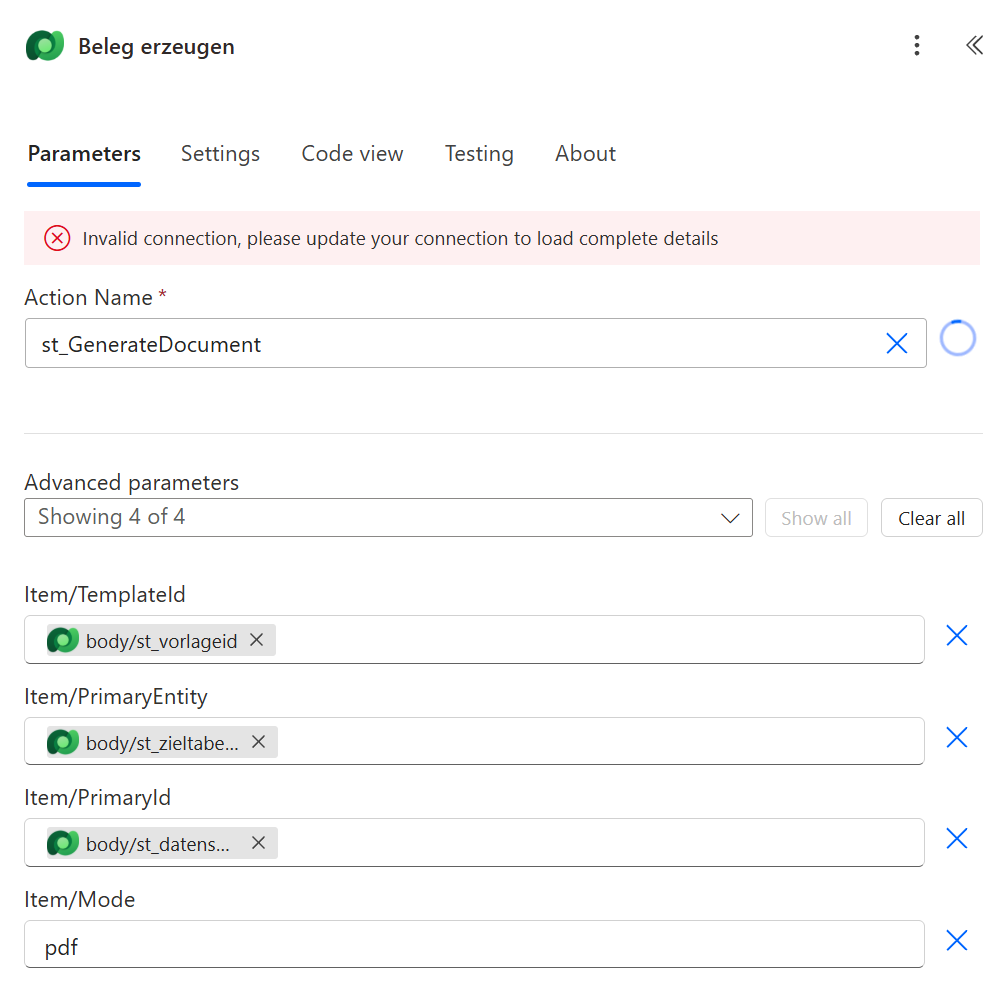
st_GenerateDocument with its four fields. The red banner is shown here because no connection has been assigned to the example flow yet.
- 1The head of the card with the Dataverse icon. The designer names the step “Beleg erzeugen”.
- 2“Action Name”: the name of the action, here
st_GenerateDocument. - 3The three IDs: template, table and record. In the created flow they come as data values from the trigger row.
- 4“Item/Mode” with the value
pdf: the document comes as a finished PDF, as Base64 text inPdfBase64.
E-invoice
A template creates an e-invoice if its key eRechnung carries "aktiv": true. What the user sets and reads is described under E-invoice: ZUGFeRD and XRechnung. Mapping, checking, XML and PDF/A are handled by Smart Templates in a single place; the plugin and the local service call the same one. Templates without a switched-on e-invoice run as before.
The default is strict: if a required detail is missing, a check calculation does not match, a unit price is negative or the print rejects the PDF/A, nothing is created, not even a normal PDF or a reading copy. The error text is the sentence from the core. The only exception is Mode=vorschau. Amounts are rounded commercially to two decimal places before the check; prices, quantities and percentages are not.
The modes of st_GenerateDocument with e-invoice
| Mode | “PDF with embedded e-invoice” (ZUGFeRD) | “XML only” | E-invoice error | “Only if …” does not apply |
|---|---|---|---|---|
pdf (default; button, email, flow, own code) | PdfBase64 is the PDF/A-3 with the XML. | XmlBase64 and XmlFileName; PdfBase64 is the reading copy or empty. | Abort with the sentence from the core. | The document as before, a note in Message. |
vorschau (only the full preview of the designer) | PDF/A-3 with the XML. | The normal PDF; plus XmlBase64. | The PDF without XML, plus WARNING: e-invoice: …. | Like pdf. |
erechnung (“Check with sample record” in the designer, st_GenerateEInvoice) | No PDF; the report is in LayoutJson, XmlBase64 with valid XML. | Likewise. | The report with the findings. | The report with angewendet: false. |
Mode=vorschauandMode=erechnungdo not trigger a flow.Mode=layoutandMode=planrun without e-invoice; the plan collects its fields anyway.- With a switched-on e-invoice,
Messagehas a section “ · E-invoice: …” after the head line (in English, like the rest of the line). It names what was delivered: “embedded (PDF/A-3b, factur-x.xml, n bytes)”, “XML only (Datei, n bytes, with reading copy)”, “not applied (condition not met)” or “not created - the PDF has no e-invoice”. With “XML only” without a reading copy, the head line readsOK: e-invoice XML, n bytes, because there are no pages. - All branches set
XmlBase64andXmlFileName, empty where there is no e-invoice.
st_GenerateEInvoice: only the XML
| Input | Meaning |
|---|---|
TemplateId | The template (st_smarttemplate) with a switched-on e-invoice. |
PrimaryEntity | The table, for example invoice. |
PrimaryId | The record. |
| Output | Meaning |
|---|---|
XmlBase64 | The e-invoice as XML (Base64); with ZUGFeRD the factur-x.xml that is otherwise inside the PDF. |
FileName | The name from the standard, for example XRechnung_R-2026-0042.xml, or the PDF name of the template with .xml. |
Message | OK: e-invoice <Name> (<Dokument>), n bytes, <Datei>, followed by the notes of the e-invoice (WARNING:). |
The action calls st_GenerateDocument with Mode=erechnung, with the caller’s privileges; data assembly and generator exist only once. It aborts if the record is missing, the document would not be created from the real record, the template has no switched-on e-invoice, its “Only if …” does not apply or the e-invoice has an error. The sentences are listed under Problems and messages: E-invoice. The pre-check for PDF/A does not count here because no PDF is created.
st_StandardLesen and st_StandardHochladen: the standards
| Input of st_StandardLesen | Meaning |
|---|---|
Kennung | For example xrechnung-ubl. Empty returns the list of all standards, bundled and custom. |
Fassung | For example 3.0.2. Empty is the latest valid one. |
Teil | Empty or uebersicht, pflicht, abschnitt:<id>, codeliste:<id> (JSON); anmerkung (the explanation file), schema:<datei> (a file of the schema set), formatschema (text); vorschlaege (the suggestions from the standard fields of the Dynamics invoice, JSON; with an identifier, tailored to the standard); format (the description from Own standards for the e-invoice as Markdown, in the output Text); liste. format, formatschema and vorschlaege work without an identifier. |
Sprache | de or en for the texts of the overview. |
| Outputs | Json for the list and overview, Text for files (the other one is empty in each case), Message. An unknown standard or part is an error with a German sentence. |
| Input of st_StandardHochladen | Meaning |
|---|---|
Inhalt | An explanation file (XSD) as text, or |
PaketBase64 | a ZIP with the explanation file and, with a schema set of your own, that set as well, as Base64, 768 KiB packed at most. |
Ersetzen | ja replaces an existing standard of the same version. Empty or nein: does not. Any other value is an error. |
Output Ergebnis | JSON with ok, kennung, fassung, befunde, id and ersetzt. On rejection ok: false with the findings; this is not an exception, the list of findings with their locations is the answer. |
- Checking happens before anything is stored; the identifiers of the bundled standards are blocked. Storing happens with the caller’s privileges: the role “Smart Templates Designer” has create and write privileges on the table of custom standards (see Rights and roles: Designing templates).
- Reading runs with the system’s service: whoever may print does not need a privilege on this table.
- Only the web API can delete, and only custom standards (table
st_erechnungstandard, role “Smart Templates Designer”). Bundled ones cannot be deleted.
The button
The functions SmartTemplates.Button.downloadEInvoice and …downloadEInvoiceAll call st_GenerateEInvoice and offer the XML for saving, with several rows in a ZIP file. They do not know a flow (see What happens on click: The e-invoice).
Actions of the AI assistant
st_FormatLesen
Input Teil: Grundlagen, Daten, Ausdrücke, Objekte, Tabellen, Beispiel, E-Rechnung, E-Rechnung-Listen or alle; empty returns the list of parts. Output Text: the part of the format description as Markdown, the same description as in the chapter Template format.
st_VorlageAendern
| Name | Meaning |
|---|---|
VorlageId | ID of the template (st_smarttemplateid). |
Aenderungen | The change as a JSON Patch (RFC 6902) against the JSON of the saved template. All or nothing: if one step fails, none applies. |
Beschreibung | Required: one sentence saying what is changed and why. The designer displays it. If it is missing, the action answers with ok: false and an error whose wo is Beschreibung. |
Ergebnis (output) | JSON with ok, fehler and hinweise (each with wo and was), angewendet, vorlage, aenderungId and text. |
The action reads the template with the caller’s privileges, applies the change, checks the result as with import and stores it in “Smart Templates KI-Änderung”. It does not change the saved template. An error comes as a response with ok: false, not as an exception. The designer takes the stored change over into the open template (see Working with the AI assistant in Copilot: What happens then).