
Template format
In short
Every template is a JSON file. The designer writes it, the renderer reads it. “Export” downloads the file, “Import” loads a file back into the designer. This page describes every key: what it does, which values are allowed and what applies when it is missing.
Structure at a glance
A template is a JSON object. The most important keys at the root:
name,cultureand the number and date settings,page: sheet size and margins,brand: default font and line spacing,sources: the data sources with relationships and rules,variables: custom variables,body: everything on the sheet (texts, images, codes, groups, tables, shapes, page breaks),eRechnung: when switched on, the e-invoice for the document (assignment to a standard).
{
  "name": "Sample",
  "culture": "en-US",
  "page": { "widthMm": 210, "heightMm": 297 },
  "body": []
}
Ground rules
- Spelling: keys in camelCase, exactly as in the tables. The renderer also reads many keys in other upper and lower case, the designer does not. Values of
type(for example"Group") are always case-sensitive. - Units: positions and sizes in millimetres (keys end in
Mm), stroke widths and font sizes in points (Pt), rotation in degrees (rotDeg). - Numbers as numbers:
"xMm": 10, not"xMm": "10". Only underpagedoes the designer convert number text. - Colours:
#RGB,#RRGGBBor#RRGGBBAA(the#may be omitted) or a colour variable{{@Name}}. Colour names such asredcount as »no colour« and are reported. - If a key is missing, its default applies.
nulldoes not override a default. - Unknown keys are not an error, but they have no effect. The renderer reports them as a warning (at the root, under
pageandpage.margins, on every object, instyle,columns[],variables[]andsources[]). Underbrand,page.border,rows,cells,bild,anchor,sorts,borders,variants, in if-then branches and inrelations[],fields[]andrules[](includingselect,group,vars) they are skipped silently. - Keys starting with
_are notes of the designer. They have no effect and are not reported (except underpageandpage.margins). Do not write your own. - Strict JSON: no comments, no trailing comma, no BOM. At most 128 JSON levels; every group counts two, which is enough for about 60 nested groups.
Good to know
When opening a template, the designer converts some old forms (for example "Band" to "Group", or a table directly on a relationship to a table on a rule). The converted form is printed only after the template has been saved in the designer.
The root
| Key | Type | Default | Meaning |
|---|---|---|---|
name | Text | – | Name of the template. In Dynamics the name of the record applies. |
culture | Text | de-DE | Language of the template: dates, month names, yes/no words, number style; as long as optionLabelLanguage is empty, also the language of the option labels. An unknown code prints German, with a warning. The interface offers de-DE, de-AT, de-CH, en-US, en-GB. |
dateFormat | Text | short format of the language (d) | Format for date values without their own pattern. .NET patterns such as MM/dd/yyyy or %%benutzer (format of the user who prints). |
dateTimeFormat | Text | g | The same for date with time, for example MM/dd/yyyy HH:mm. |
currencySymbol | Value with if-then | € | Currency symbol for {{Currency:…}}. Where it goes depends on the effective country style (numberStyle, otherwise from culture; on a variable its own): en in front without a space ($1,234.56, -$1,234.56, R$1,234.56), but with a non-breaking space if the symbol ends in a letter or a period (CHF 1,234.56, -CHF 1,234.56, Fr. 1,234.56), ch in front with a non-breaking space (CHF 1'234.56, CHF -1'234.56), otherwise after the amount with a non-breaking space (1.234,56 €). Empty means €, not »no symbol«. May be a placeholder, read on the main record. |
currencyDecimals | Value with if-then | 2 | Decimal places for currency, 0 to 10. Does not apply to {{Number:…}}. Like currencySymbol, it may be a placeholder, read on the main record. |
numberStyle | Value with if-then | from culture | Country style: de 1.234,56 · en 1,234.56 · fr 1 234,56 · ch 1'234.56 · plain 1234.56. Also decides where the currency symbol goes. |
thousandSeparator | Value with if-then | empty | an (on), aus (off) or empty. Empty: automatic decimals without separator, fixed decimals with separator. |
optionLabelLanguage | Value with if-then | empty | Option label language: in which language choice, multi-select, yes/no, status and status reason fields from Dynamics print their label. The ID of the language in Dynamics as text ("1031" German, "1033" English; the designer offers the installed languages) or a code like en-US. Empty: the language from culture (de-AT and de-CH count as German, en-GB as English). If a label is missing in this language or the language is not installed in Dynamics, the base language of the environment is printed. No placeholder; a value that is not a language counts as empty and is reported as a warning. Conditions still compare with the label in the language of the user who creates the document. |
orphanLines | Number | 2 | Minimum lines of a split text per page. |
minPages | Number | 0 | Minimum number of pages; missing pages are added empty (at most 200). |
repeatTableHeader | Yes/No | true | Default for all tables: repeat the header row on following pages. |
pdfName | Value with if-then | empty | PDF name: the name of the file without .pdf, a text with placeholders as in the document, for example "Invoice {{invoicenumber}}". Evaluated once per document on the main record. Characters that are not allowed in file names (such as /, : or ?), control characters and any whitespace become _; .pdf is added. The name is used for the attachment of the e-mail actions, the output FileName, the download in the designer and the title of the PDF; an e-invoice »XML only« gets the same name with .xml (the file inside a ZUGFeRD PDF is always called factur-x.xml). Empty: the previous name. If it gives nothing for a record: the name of the template, as for the e-mail attachment. For a new template the designer inserts {{<name field of the main source>}}. |
pdfNameMax | Number | 200 | At most this many characters for pdfName; the rest is cut off, .pdf does not count. 1 to 200, more counts as 200. |
page | Object | A4, margins 18/15/18/20 | Sheet, see below. |
brand | Object | Arimo, line spacing 1 | Font and line spacing, see below. |
sources | List | – | Data sources, see below. Without a primary source the designer asks for one when opening. |
variables | List | – | Custom variables, see below. |
body | List | [] | The objects on the sheet, see below. |
eRechnung | Object | – | The e-invoice for the document: which standard, which output and which value goes into which field, see »E-invoice (eRechnung)«. |
wahlen | Object | – | If-then choice of the e-mail template for buttons in Dynamics: { "mailvorlage": { "faelle": [ { "wenn": condition, "dann": ID of the e-mail template } ], "sonst": ID } }. The first matching case wins, otherwise sonst applies; a case without dann is skipped. Evaluated on the main record when the document is created; the result is used only if a button or the action st_CreateEmail or st_SendEmail passes no EmailTemplateId (an e-mail template that is passed takes precedence). No effect on the document. |
varLabels | Object | – | Display names of variables in the designer, { "path": "display name" }. No effect on printing. |
guidesOff | Yes/No | false | Guide lines off in the designer. No effect on printing. |
art | Text | empty | Only on a building block: "baustein". If the key is missing, the file is a template. Set when created and fixed afterwards: do not write or change it. |
bausteinKennung | Text | – | Only on a building block: its fixed key (GUID) by which import and building block objects find it again in every environment. Assigned when created and fixed afterwards. |
bausteine | List | – | Only in an exported file: the building blocks the template uses, each once in full, each with geaendertAm (time of the last change, only shown on import). The import takes identical ones, creates missing ones and lets you choose for differing ones; the saved template does not contain the key. Do not write it. |
These keys occur but should not be written: templateId, version, rendererVersion and dataSource (no effect), warmhalten and istAktiv (mirrors of columns of the record), pageHeader and pageFooter (old form, converted to repeating groups when read).
Sheet and margins (page)
| Key | Type | Default | Meaning |
|---|---|---|---|
widthMm | Number | 210 | Sheet width. The sheet is made only from widthMm and heightMm; landscape means swapped dimensions. |
heightMm | Number | 297 | Sheet height. |
size | Text | A4 | Only a label (A4, A3, A5, Letter, Legal, custom). Sets no dimension. |
sizeName | Text | – | Remembers the choice in the designer, same values as size. |
margins | Object | 18/15/18/20 | Page margins: topMm, rightMm, bottomMm, leftMm. Short forms such as top are not read. |
ignoreMargins | Yes/No | false | All margins count as 0 (the values stay stored). |
border | Object | – | Frame around every page, see next table. |
Key in page.border | Type | Default | Meaning |
|---|---|---|---|
enabled | Yes/No | false | Main switch. |
color | Colour | #333333 | Stroke colour. |
widthPt | Number | 1 | Stroke width; 0 prints no frame. |
insetMm | Number | 0 | Distance from the sheet edge. |
firstSpecial, lastSpecial | Yes/No | false | The first or last page gets its own frame. |
first, last | Object | – | That own frame: enabled (default true), color, widthPt, insetMm. It inherits nothing from the main frame. |
Font and line spacing (brand)
| Key | Type | Default | Meaning |
|---|---|---|---|
bodyFont | Text | Arimo | Default font for text without its own font and for style.font = "body". A font must be uploaded to Dynamics; if it is missing, Arimo prints with a warning. |
headingFont | Text | Arimo | Font for style.font = "heading". The designer sets both the same. |
lineSpacing | Number | 1 | Default line spacing, at most 5. |
listIndentMm | Number | 5 | Indent per list level, at most 20. |
logoAssetId, accentColor, accentColor2 and headingColor occur in older templates and have no effect on printing.
Values with if-then
currencySymbol, currencyDecimals, numberStyle, thousandSeparator, optionLabelLanguage and pdfName are objects with a fixed value and branches. A plain value ("currencySymbol": "$") is also read and counts as a fixed value without branches.
"currencySymbol": { "value": "€", "rules": [ { "when": "country == 'US'", "value": "$" } ] }| Key | Type | Meaning |
|---|---|---|
value | Text | Applies when no branch matches. |
rules | List | Branches { "when": condition, "value": value }. The first branch with an empty or true condition wins. |
- It is evaluated once per document on the main record.
- Custom variables (
@Name) also work in the condition, and in the value ({{@Name}}). If such a variable itself depends on this setting (a cycle), the choice made with the template's fixed values applies, and the document reports a warning (»template setting '…' is circular«). It names where the variable stands: in the value with »its value reads the custom variable '@…'«, in a condition with »a condition in its branches reads a custom variable«. - A matching branch with an empty value yields the built-in default (
€, 2 decimals, style of the language, foroptionLabelLanguagethe language fromculture, forpdfNamethe name of the template, as for the e-mail attachment), not the fixedvalue. optionLabelLanguagewith{ "value": "", "rules": [ { "when": "country == 'US'", "value": "1033" } ] }prints the option labels in English for customers in the US, otherwise in the language fromculture.pdfNamewith{ "value": "Rechnung {{invoicenumber}}", "rules": [ { "when": "country == 'US'", "value": "Invoice {{invoicenumber}}" } ] }names the fileInvoice_R-1.pdffor customers in the US, otherwiseRechnung_R-1.pdf.- The checkbox “Take the currency from the record” has no key of its own. It consists of a relationship of the primary source with
"kind": "lookup"totransactioncurrency(namedCurrencyby the English designer,Waehrungby the German one) and the fixed value{{Currency.currencysymbol}}incurrencySymboland{{Currency.currencyprecision}}incurrencyDecimals; if the relationship has a different name, that name is in the placeholder. The designer recognises the checkbox by this relationship and by the placeholder incurrencySymbol. Leave both in place.
Custom variables (variables)
A custom variable has one single value everywhere in the document. In text it is written {{@Name}}, in conditions @Name.
| Key | Type | Default | Meaning |
|---|---|---|---|
name | Text | required | Unique; case counts; spaces are allowed, { } | : are not. With duplicate names the first one applies, with a message. |
type | Text | text | text, number, currency, boolean, date or color. Always state it. Only number and currency calculate. |
default | Text | – | Value when no branch matches. Text or formula with {{…}}; for number and currency also a plain sum(quote_details.amount) (over a relationship, not over a rule result), for date a plain dateadd(…). |
rules | List | – | Branches { "when": condition, "value": value }; the first matching one wins. A match with an empty value yields EMPTY. |
symbol | Text | template | Only currency: own currency symbol (may be a placeholder). If it reads a variable whose own symbol is a placeholder again (also the variable itself), it is resolved only one level deep: the inner placeholder appears literally in the document, and the document warns. |
decimals | Text | template | Decimal places 0 to 10. Empty: for currency the decimals of the template, for number automatic up to 4. |
numberStyle | Text | template | de, en, fr, ch or plain. |
thousandSeparator | Text | template | an (on), aus (off) or empty. |
- All custom variables are calculated once per document on the main record, after the data has been loaded and before the first rule runs. That is why they do not see rule results.
- A cycle (A reads B, B reads A) makes all involved variables empty and is reported.
- Display per type:
numberin the number style,currencywith symbol,dateindateFormat,booleanas yes/no in the template language,textandcolorliterally.
"variables": [
  { "name": "PaymentTerms", "type": "text", "default": "14 days",
    "rules": [ { "when": "totalamount > 1000", "value": "30 days" } ] },
  { "name": "Gross", "type": "currency", "default": "{{sum(quote_details.baseamount)}} * 1.19" },
  { "name": "Due", "type": "date", "default": "{{dateadd(createdon, 30, day)}}" }
]
Data sources (sources)
sources is a list of sources. The primary source is the record the document is printed for (for example a quote). Additional sources are lists that are loaded independently of it (for example all currencies). Relationships hang below every source, rules hang below sources and relationships.
Source
| Key | Type | Default | Meaning |
|---|---|---|---|
id | Text | – | Identifier, for example src1. |
name | Text | – | Display name. |
primary | Yes/No | false | Primary source. Set it to true on exactly one source. When printing without true the first source applies, but when opening, the designer asks for a primary source and creates a new source for it. |
entity | Text | required | Logical table name, for example quote. |
basePath | Text | primary source "" | Primary source: must be empty. Additional source: required, not empty; its list lies at the root under this name. The designer uses the table name. |
idAttr | Text | – | Primary key, for example quoteid. Saves a query. |
fields | List | – | Used fields, see »Field«. If the list is missing or empty, all columns are fetched. |
relations | List | – | Relationships. |
rules | List | – | Rules on the source. |
sampleId | Text | – | Sample record of the draft (GUID). |
The designer maintains set, nameAttr, locked, sampleName and sampleMissing itself.
Field
| Key | Type | Meaning |
|---|---|---|
name | Text | Required: exact logical column name. A lookup is called _<column>_value (for example _customerid_value). For {{x_code}} and {{_x_value_id}} only x or _x_value goes into the list. |
label | Text | Display name; maintained by the designer. Leave it out for new fields. |
type | Text | string, number, money, date, boolean, optionset, lookup, image or file. Always state it; for lookups lookup (otherwise the design canvas shows the GUID instead of the name). |
Caution
If fields is not empty, only what it lists is queried (plus key columns and relationship fields). A used but unlisted field stays empty. A warning appears only for fields behind relationships and in table cells, not for fields of the main record. List every used field, including sort and filter fields of rules. Do not add the primary key as a field, it belongs in idAttr.
Relationship
| Key | Type | Meaning |
|---|---|---|
name | Text | Required. The name is the path segment in the placeholder ({{Customer.name}}). When creating a relationship the designer uses the navigation name from Dynamics; older templates also carry freely chosen names such as Customer or Items. Both work, because loading uses entity and refAttr. Only letters, digits and _, unique among the fields and rules of the same level. |
kind | Text | Required: lookup (N:1, one record) or collection (1:N, a list). Anything other than exactly collection counts as N:1. |
entity | Text | Required: target table (for collection the child table). |
refAttr | Text | Required. lookup: the lookup column on the parent row (for example customerid). collection: the foreign key on the child table (for example quoteid). |
idAttr | Text | Primary key of the target table (saves a query). |
fields, relations, rules | Lists | as for the source. |
If name or entity is missing, the relationship is skipped silently; if refAttr is missing, with a message. If kind is missing or contains anything other than collection, it counts as N:1. So always state all four. A relationship is loaded only if something in it is bound. Relationships are loaded at most six levels deep.
Rule
A rule takes the rows of a list (relationship collection or additional source) and filters, groups, sorts and selects them. Its result lies as a sibling of the relationship on the parent node under the rule name.
| Key | Type | Default | Meaning |
|---|---|---|---|
id | Text | – | Identifier, unique in the template. |
name | Text | required | Unique in the whole template and different from every field and relationship on the parent node, its own included; if the result lies at the root, also different from the list of every further source (otherwise the result replaces them). The name field in the designer does not accept such a name; the check gives a hint, the document a warning. The path segment is derived from it: whitespace becomes _, punctuation is dropped (»Size (m²)« becomes Size_m). |
filterExpr | Text | no filter | Condition per row, without {{ }} (see »Conditions«). |
group | Object | – | Grouping: by (list of fields of the row itself, without dot path; empty = everything into one row) and aggs (calculations). |
select | Object | – | Sorting and selecting. |
vars | List | – | Rule variables, see below. |
Key in group.aggs[] | Meaning |
|---|---|
name | Name of the new field. |
fn | sum, count, avg, min or max. |
field | Field of the row (also via a lookup, Product.price); meaningless for count. |
nachkomma | Only sum and avg: every value is first rounded to these decimals, then summed. A whole number from 0 to 6; more counts as 6, a negative number as no value, and so does a value that is not a number (for example "abc"); the check reports it as a note. If it is missing, the decimals of the template apply. |
Key in select | Meaning |
|---|---|
mode | empty = all rows (sort only) · topN = the first n · first, last, nth = one single record (not table content). The selection only shortens the result, not the loading; only a filter loads less. |
n | Number for topN, position for nth (from 1). A whole number; whatever cannot be read as a whole number (for example "abc") counts as no value, that is 1, and the check names it as a note. |
sorts | Sort levels { "by": field, "dir": "asc" or "desc" }. Empty values always come last. |
Order inside a rule: filter → grouping and calculations → sorting → selecting → rule variables. After group only the by fields and the calculations remain.
Key in vars[] | Meaning |
|---|---|
name | Name of the new field in every result row. |
type | Always state it: number or currency calculate, text concatenates, boolean, date, color insert values. |
default | Formula; every reference in {{ }}, for example {{baseamount}} * 1.19. |
rules | Branches { "when": condition, "value": formula }, condition against the row. |
Where the result of a rule lies
| Rule sits on … | Result lies under … | Example |
|---|---|---|
| a relationship directly below the primary source | the rule name at the root | rule »Open« on quote_details → Open |
| a relationship below a lookup | lookup name + rule name | rule »Active« on the contacts of the customer → Customer.Active |
| a relationship below a list | the rule name in every row of the outer list | rule »Expensive« on the batches of every item → in a table on the items itemsPath: "Expensive" (relative) |
| an additional source | the rule name at the root | AllCurrencies |
| the primary source itself | the rule name at the root | KeyFigure (with mode: first) |
What a rule may see
- Allowed: its own row, fields via lookups, fields of the parent rows up to the root, aggregations over its own sub-lists, results of rules below it, on the same relationship and on a neighbouring relationship (their result lies at the common parent row); a rule on a source also reads the results of the rules on other sources; plus custom variables,
System.*. Rules are calculated in the order of the plan: the rule that is read comes first. - Forbidden: results of rules further up — for a rule on a relationship also the results of rules on a source (they lie at the root and count as »above everything«) —, the rule itself, cycles. A reference upwards is deleted and reported. A cycle switches off all rules.
- An additional source is always loaded completely; the rule shortens only afterwards.
- A rule only calculates if its result is bound somewhere (table, placeholder, other rule).
- Empty stays empty: if a field is on the row but empty, that holds for this row, also for its raw value
<field>_code; a field of the same name further up does not step in. Only what the row does not have at all is looked up further up. This also applies to a path through an empty lookup that the level knows: ifcurrencyis empty on the row,currency.namein a rule filter is empty, even if a lookup of the same name further up is filled;currency.name != ''is then false.
"sources": [ {
  "id": "src1", "name": "Quote", "entity": "quote", "primary": true, "basePath": "", "idAttr": "quoteid",
  "fields": [ { "name": "name" }, { "name": "totalamount" } ],
  "relations": [ {
    "name": "quote_details", "kind": "collection", "entity": "quotedetail", "refAttr": "quoteid",
    "fields": [ { "name": "productdescription" }, { "name": "quantity" }, { "name": "baseamount" }, { "name": "sequencenumber" } ],
    "rules": [ { "id": "r1", "name": "Items", "filterExpr": "",
                 "select": { "mode": "", "sorts": [ { "by": "sequencenumber", "dir": "asc" } ] }, "vars": [] } ]
  } ],
  "rules": []
} ]
A table on this rule has "itemsPath": "Items".
Placeholders
A placeholder stands in double curly braces in the text: {{…}}. Paths are case-sensitive and consist of letters, digits and _, separated by dots.
| Form | Example | Meaning |
|---|---|---|
| Field | {{name}} | Field of the current level: the root, in a table cell the row. |
| via a lookup | {{Customer.name}} | Customer is the name of the relationship. |
| Display name of a lookup | {{_customerid_value}} | Name of the linked record without a relationship; {{_customerid_value_id}} is its GUID. Dynamics does not return the Dataverse column customeridname: it stays empty or makes printing fail. |
| Label of a choice | {{statuscode}} | Choice, multi-select, yes/no, status and status reason from Dynamics: the label in the option label language (optionLabelLanguage); multi-select separated by »; «. Also in a table cell, in first(…) and in a group row. |
| Raw value of a choice | {{statuscode_code}} | Number or true/false instead of the label. |
| Rule result (single value) | {{MostExpensive.price}} | Rule with mode: first, last or nth. |
| First value of a list | {{first(Items.name)}} or {{Items[0].name}} | A list on its own ({{Items}}) prints nothing. |
| Aggregation | {{Currency:sum(Items.baseamount)}} | first, sum, avg, min, max over a field of a list, that is a relationship collection or a rule result; count also over the list itself (count(Items)). The brackets hold exactly one field: with a calculation, a comma or a second aggregation (sum(Items.price * Items.quantity)) it stays empty — count still counts the rows —, and the document warns (»summary '…' could not be calculated«), also in a condition (there it is empty, not 0), in the value of a custom variable and in a rule formula; inside a calculation the empty result counts as 0, like an empty field. In a rule calculation, a sum, average, minimum or maximum whose field holds a calculation stays empty as well. |
| Custom variable | {{@Gross}} | Always the value on the main record. |
| Date arithmetic | {{Date:dateadd(createdon, 30, day)}} | see »Date arithmetic«. |
| System | {{System.Date}}, {{System.DateTime}}, {{System.Time}}, {{Date:System.Now}}, {{System.User}} | Today's date and the user who prints. |
| Page | {{Page.Current}}, {{Page.Total}} | Only in text (also header, footer, cell), never in conditions or formulas. |
Formatters
Without a formatter a date prints as ISO text and a number with a dot. Choice and yes/no fields from Dynamics appear with their label (»Yes«/»No«, »Paid«) in the option label language; real truth values (_code, rule variables without a type) appear as True/False, a rule variable of type boolean holding a truth value as »Yes«/»No« in the template language (its raw value is under <Name>_code). So always format. The names are case-sensitive.
| Placeholder | Effect |
|---|---|
{{Currency:totalamount}} | Decimals, style and symbol of the template (or the variable). {{Currency:totalamount|USD}} sets another symbol. |
{{Number:quantity}} | Without a value as many decimals as needed, at most 4, without thousands separator. {{Number:quantity|2}}: exactly 2 decimals, with separator. |
{{Date:createdon}} | In the dateFormat of the template. {{Date:createdon|en-US|MM/dd/yyyy}} with language and own pattern; {{Date:createdon||yyyy-MM-dd}} with pattern only. |
{{DateTime:createdon}} | Like Date, with time (dateTimeFormat). |
{{Bool:field}} | A yes/no field from Dynamics: its label in the option label language, also a custom one like »Unpaid«. Without a label from Dynamics (custom variable, rule variable, data without Dynamics): yes/no in the template language. |
{{Rich:field}} | Display the field content as markup, for example HTML from Dynamics or Outlook. Named characters such as ü or € are read as in the browser. Whitespace between two paragraphs yields lines of its own, as in the browser: </p> <p> or </p>\n<p> one empty line, </p>\n <p> (line break and indentation, as from Outlook) two; a line break directly after <div> before the first paragraph is exactly one. Otherwise data values always appear literally. |
Where a placeholder looks
- In document text: at the root (main record).
- In a table cell: in the row. What the row does not have stays empty; only custom variables,
System.*,Page.*and aggregations over paths outside the row go to the root — the same in the cell text, in a cell condition and in the cell's if-then text. For such an aggregation the document loads the list even if it does not need it otherwise (one more query or join per list). - In a table inside a table cell:
itemsPathand all paths relative to the outer row. - In the simple column header
headerplaceholders are not resolved; useheaderCellfor that.
Conditions
Conditions stand in filterExpr, in when of if-then branches and text versions (variants), in visibleIf, in wenn of image rules, of cases under wahlen and of cases of a list of the e-invoice, and in w of the branches of a dynamic text. They name fields without {{ }}. If a field is written in {{ }} anyway, the condition does not read it; the PDF warns, the check names the place, and in the e-invoice it is an error.
| Element | Meaning |
|---|---|
== != | equal, not equal |
> < >= <= | greater, less |
contains notContains startsWith endsWith | part of text, case-insensitive; with spaces before and after |
&& || ! ( ) | and, or, not, brackets |
'Text' or "Text" | text; a doubled character stands for itself ('O''Neill') |
1.5 | number, always with a dot |
true false null | truth values, empty |
@Name | custom variable (as a whole side of a comparison) |
sum(…) avg(…) count(…) min(…) max(…) first(…) | aggregation over a field of a list (as a whole side) |
dateadd(…) | date arithmetic (as a whole side) |
- No arithmetic in conditions:
sum(a) * 1.19 > 5does not work, nor does a calculation inside the brackets (sum(a * b) > 5, see »Placeholders«). Create a variable for that. - Do not write
=,<>,&,|,AND,OR,UND,ODER(also in lower case:and,or,und,oder),notorisEmpty(alsonotEmpty,isNotEmpty). That is reported, and the expression evaluates wrongly. If such a word belongs to the name of a custom variable with spaces (@Shipping and Handling), it does not count. - Incomplete: if a part is missing (
a == 1 &&,|| b == 2,status !=without a value,!with nothing after it,()), it is reported, and the missing part never counts as met:a == 1 &&is never true,a == 1 ||only ifa == 1is true. A completely empty condition still means »always«. - Always a text: A condition is written as text in quotes (
"visibleIf": "statecode_code == 0"). UndereRechnung, awennor thewhenof an if-then branch without quotes (true,false, a number), as an object or as a list is an error: no e-invoice is created. If it always applies, leavewennout or write"when": "". - Choice and yes/no from Dynamics arrive as a label (»Active«, »Yes«). Compare numbers via the raw value with
_code:statecode_code == 0. A multi-select has a list of numbers as its raw value:contoso_tags_code contains 100000001checks whether this option is selected,notContainsthe opposite (the number without quotes; in quotescontainscompares text). The designer writes it this way too when “by option value” is chosen.contoso_print == trueandcontoso_print == falsefollow the raw value of a yes/no field from Dynamics, even with custom labels such as »Unpaid«; so do the bare name (contoso_print,!contoso_print) and a yes/no variable that takes over the field: a custom one then prints »No«, a rule variable still prints the label and carries the raw value as<Name>_codenext to it. Without a raw value (own data) the label counts: everything except the no-words is true. The comparison uses the label in the language of the user who creates the document, not the option label language that is printed. - Date:
==and!=always compare two date values by calendar day only.<,>and the like compare by day as soon as one side has no time (createdon >= '2026-08-01'). - Text:
==compares exactly, case counts. - Checking for empty:
!fieldmeans »empty«,fieldmeans »filled«. 0 and every zero with a dot (0.00),falseand »nein«, »no«, »off«, »n«, »non«, »nee« and »nie« (case-insensitive) also count as »empty«; »0,00« with a comma, on the other hand, counts as filled. With==and!=empty equals empty: an empty or missing field, a field behind an empty lookup,nulland the empty text''are equal to one another. Sofield == ''andfield == nullboth mean »empty«,field != ''means »filled«. The number 0, a label such as »No« and a real truth value No do not count as empty there: for the raw valuefield_codeof a yes/no field and for an own variable of typeboolean,== ''and== nullare false for No. Conversely, an empty value is neither yes nor no:field == falsedoes not match an empty field, not even through a yes/no variable. Check whether a yes/no field is empty withfield == '', and whether it is No withfield == false. A rule withmode: first,lastornththat found nothing is empty:!MostExpensiveis true,MostExpensive != ''false,count(MostExpensive)is 0. - Unknown variable: the result is always No, also with
!and!=.
"filterExpr": "statecode_code == 0 && (totalamount > 1000 || prioritycode_code == 1)"
"when": "count(quote_details) > 0 && name contains 'Ltd'"
"visibleIf": "discountamount == null"
Formulas
Formulas stand in default and value of variables. Every reference stands in {{ }}. If only numbers, + - * /, brackets and whitespace remain after inserting, it calculates; otherwise the text is concatenated.
- Decimal numbers with a dot:
{{net}} * 1.19. A comma (1,19) turns the formula into text. - A missing field counts 0. A real truth value (for example
{{contoso_print_code}}) counts 1 or 0; the yes/no field itself is text (»Yes«) and turns the formula into text, and so does a rule variable of typeboolean. - A formatter in a reference does not apply in a formula:
{{Currency:net}} * 2calculates withnet,{{Bool:contoso_print}}inserts the value of the field (its label). This also holds for custom variables:{{Currency:@Net}} * 1.19calculates with the value of@Net. - Dividing by 0 yields empty, with a message.
- There are no further functions (
round,%,^). - Round first, then sum:
sumandavground every single value to the display decimals before summing. That way the total matches the printed rows.
Date arithmetic
dateadd(base, count, unit) calculates with whole days, months or years.
- Base: a field,
@Variable, an ISO date (2026-01-31),System.Nowor anotherdateadd. - Count: number, field,
-fieldor@Variable; decimals are cut off. - Unit:
day(default),monthoryear(alsotag,monat,jahr). - One month added to 31 January gives 28 February.
- The result is ISO text; to display it use
{{Date:dateadd(createdon, 30, day)}}. dateaddalways stands alone, nothing before or after it.- If the calculation does not work out (count empty, missing or yes/no, unknown unit, base empty or not a date), nothing is printed and the document reports it, also for a bare
dateadd(…)in the value of a variable. - A pure time of day (»10:30«) is not a date in print:
{{Date:…}}and{{DateTime:…}}print it as it is, also through a variable of typedate;dateaddwith it as the base gives nothing.
Objects in the document (body)
body is a list of objects. Every object has a type. Objects also stand in children of a group and in table cells (columns[].cell, columns[].headerCell, rows[].cells[].content, subRows[].cells[].content).
type | Object |
|---|---|
Text | Text field with placeholders and markup |
Image | Image |
Barcode | Barcode, QR code or GiroCode (type in barcode.art) |
Group | Container for other objects; with repeatEveryPage a header or footer |
Table | Data table (with itemsPath) or free-form table (without itemsPath, with rows) |
Grid | Grid of cells, older form: a new grid can no longer be created in the designer. For new templates use a free-form table (Table without itemsPath, with rows). |
Line, Rect, Ellipse, Triangle, Star, Arrow, Polygon | Shapes |
PageBreak | Page break, only directly in body |
Position and size
| Object | xMm counts from | yMm counts from |
|---|---|---|
directly in body | left page margin | top of the usable area of sheet pageIndex (top margin or bottom edge of a header docked at the top) |
header or footer (repeatEveryPage) | left page margin | top page margin |
| in a group | top left corner of the group | top edge of the group |
| in a table cell | cell plus padding | cell plus padding |
pageIndex: design sheet, from 0. Every object directly inbodyexcept header and footer needs it. If no object carries apageIndex, an older model applies:yMmis then an offset in the flow, and some rules (riding along, tables) work differently. If it is missing, the designer assigns the sheet itself when the template is opened, which can change the printout; the check on import reports it as a note, and an AI change that leaves an object withoutpageIndexis rejected (short rule 9).wMm: width. Required for text (without it there is one word per line). Group and grid withoutwMm: full width. Tables: sum of the column widths.hMm: height.heightMmis the older spelling and applies only whenhMmis missing; the designer writes it for new groups inbody(25).- The width between the margins of an A4 sheet with the standard margins is 175 mm.
Common keys
| Key | Type | Default | Meaning |
|---|---|---|---|
id | Text | – | Identifier, target of an anchor, name in messages. |
place | Text | see below | Positioning behavior: static (Fixed position), auto (Flowing on contact), flow (Flowing). |
marginTopMm | Number | 0 | Minimum distance upwards. Directly in body only with auto, in a group with auto and flow. |
visibleIf | Text | visible | Condition: print the object only if true. Directly in body the space of a hidden object stays free; nothing moves up. A hidden group is missing together with its content. A header or footer with a false condition is missing on all pages and keeps no space free. A sheet that holds only hidden objects is dropped. |
keepTogether | Yes/No | true | At a page break, move as a whole to the next sheet. false: may be split (long text). Works only directly in body for text, group and unrotated rectangle, not with static and not for header and footer. In a group, the group's value decides: with false on a group with autoHeight: true, a text in it also runs on past the sheet edge; a grid in it stays whole and moves to the next sheet together with everything beside it. On images, codes, lines, shapes, rotated rectangles and grids (Grid), printing ignores false: they always move as a whole; only a grid taller than a sheet is split, and only between two rows (with a message). |
rideAlong | Yes/No | true | Only directly in body with pageIndex: an object that lies on a larger one with at least 20 % of its own area moves with it; not for static, tables, grids and page breaks, and not if the larger one itself moves along with another. false switches it off. |
frontRank | Number | 0 | Front rank −50 to 50; higher lies in front. |
rotDeg | Number | 0 | Clockwise rotation; only shapes, images and codes (codes only 0, 90, 180, 270). |
cornerRadiusMm | Number | 0 | Corner radius: rectangle, fill and frame of group and text, table frame. |
style | Object | – | Font, colour, fill, frame; see »Style«. |
anchor | Object | – | Position relative to a sibling in the same group: to (its id), h (alignLeft, alignRight, alignCenterH, rightOf, leftOf), v (alignTop, alignBottom, alignMiddle, below, above), dx, dy. |
If place is missing: directly in body every object behaves like auto. In a group or cell, text, image, codes and shapes are fixed (static), groups, tables and grids behave like auto. The designer writes "place": "auto" for new texts, images, codes and shapes in body; new groups, tables and page breaks get no place.
staticstays exactly where it is and may overlap. Exceptions: a table starts at its design position but breaks across pages normally; a grid directly inbodybehaves likeauto.autostays where it is and only moves down if an object above would otherwise overlap it.flowkeeps the drawn distance to the object above and moves down by exactly as much as that object grows. It never moves up. To move along, the object above needs a drawn bottom edge (table with data, group with height or text withautoHeight: false).
Header and footer
A group with "repeatEveryPage": true appears on every page. If its yMm is at most 0.5 (so it starts at most 0.5 mm below the top margin), it is a header, and the remaining content starts below it. If it ends at most 0.5 mm above the lower end of the printed area or lower, it is a footer, and the content ends above it. In between it is a free-standing area: the remaining content continues below it if it would otherwise run into it, across the full width.
- Position of the footer:
yMm= sheet height − bottom margin − height − top margin. For A4 with the standard margins and 12 mm height: 297 − 18 − 12 − 18 =249. pageRule:first,notFirst,last,notLast,even,odd; empty = all pages.excludePagesText: exclude pages, for example"1, 3-5".reserveSpaceoccurs in older templates and has no effect.
Text
| Key | Type | Default | Meaning |
|---|---|---|---|
value | Text | – | Content with placeholders and markup; \n breaks the line. |
wMm | Number | required | Width of the text field. |
autoHeight | Yes/No | true | Height follows the text. false: hMm is the drawn height (for »Flowing« and riding along); the whole text is still printed, frame and fill as high as the text, an overflow is reported. |
minHeightMm, maxHeightMm | Number | – | Height limits, only with autoHeight: true; what goes beyond maxHeightMm is dropped and reported. |
padTopMm, padRightMm, padBottomMm, padLeftMm | Number | 0 | Padding. |
variants | List | – | Text versions { "when": condition, "value": text, "name": … }. The first matching one replaces value completely; if none matches, the text stays empty. The version with an empty when belongs at the end. |
Markup in value: <b>, <i>, <u>, <s> (strikethrough), <sup>, <sub>, <br>, <span style="color:#C00000; font-size:12pt">, paragraphs and lists <p a="l" e="0" m="•"> (a: l, c, r, j; e: indent level 0 to 5; m: marker) (markers •, –, ▪, 1., a), i.), links <a href="https://…"> (only http, https, mailto, tel), image in text <img k="logo_full" w="25" h="15">. Dynamic text: <cif d="…">label</cif>; d is Base64 (UTF-8) of a list [{ "w": condition, "h": content }]. The h of the first branch with an empty or true condition is printed; if none matches, nothing. Only the designer shows the label between the tags. Formula: <formel w="…" h="…" u="…" q="…" d="…">; q is the LaTeX source, the designer calculates the dimensions and d from it. Keep both unchanged; new ones are created by the designer. A part of a bold text (style bold, table header or <b>) prints regular with <span style="font-weight:normal">…</span>; the innermost markup wins, a <b> inside is bold again. Likewise a part of an italic text (style italic or <i>) prints upright with <span style="font-style:normal">…</span>; an <i> inside is italic again. Both together: <span style="font-weight:normal;font-style:normal">…</span>. Underline and strikethrough cannot be switched off this way. A highlight is <span style="background-color:#FFF59D">…</span>; only a color code is allowed (#rrggbb, #rgb, #rrggbbaa), no color name. <strike>, <del> and text-decoration:line-through print like <s>; write <s>. As in the browser, a style also works on <b>, <strong>, <i> and <em> (not text-align; alignment belongs on the paragraph <p a="…">), text-decoration-line:underline or line-through like <u> or <s>, and font-style:oblique (without an angle or from 14deg) like italic; still write the forms above. Other tags (for example <ul>) stay as text including their brackets; a list marker m="…" that is not allowed yields a paragraph without marker. Named HTML characters (ü, €, –) apply as in the browser. Text after </p> or </div> starts a new line. Font names in style stand in '…'; the renderer reads " (for example from Outlook) as well. The designer writes rich: true itself; the renderer does not need it.
Image
| Key | Type | Meaning |
|---|---|---|
wMm, hMm | Number | Required; the frame of the image. |
bild | Object | The image source, see below. |
Key in bild | Default | Meaning |
|---|---|---|
art | asset | asset (uploaded image), feld (image column), datei (file column), base64. |
pfad | – | For asset the key of the image (logo_full), otherwise the data path (may be {{…}}). |
entitaet, idFeld | – | Only feld and datei: table and key field of the source. |
einpassung | einpassen | einpassen (fully visible), fuellen (fill the frame, overflow is cut), original. |
lage | mittig | Position when fitting: obenLinks, oben, obenRechts, links, mittig, rechts, untenLinks, unten, untenRechts. |
maske | – | Cut-out: kreis, ellipse, eckenRund, dreieck, stern, vieleck. |
wennKeinBild | still | still (nothing, takes no height), notiz, platzhalter (grey box). |
qualitaet | original | Only feld: original or niedrig. |
vorschau | true | Designer only: show the image on the design canvas or a placeholder. |
regeln | – | »Unless«: { "wenn": condition, "dann": { "art", "pfad", … } }; the first matching one chooses the source. |
daten | – | Only on import, when uploading AI changes and in changes made through the AI assistant: a new image as a data: address, PNG, JPEG or SVG (data:image/png;base64,…, an SVG graphic also data:image/svg+xml;utf8,<svg …>). The designer uses an identical existing image or creates it in the image table (SVG as PNG), puts its short name into pfad and removes daten. pfad is the wish for the short name. Also works in a branch of regeln. |
name | – | Only together with daten: the name of the new image in the image table. |
Older images carry binding ("@logo") and fit; with bild they are not read.
Barcode, QR code and GiroCode
"type": "Barcode" is a barcode, a QR code or a GiroCode (EPC QR code per EPC069-12, for SEPA credit transfers in euros); which one is given by barcode.art. Position, size, visibleIf and place as for an image. A code is never split and never shortened at the bottom edge of a group with a fixed height: if it does not fit there completely, it is left out and the document warns (a GiroCode then prevents the document).
| Key | Type | Meaning |
|---|---|---|
wMm, hMm | Number | Required; the box. The code is fitted print-sharp: a bar or a dot is a whole multiple of 1/600 inch, so the code is often a little smaller than the box. |
rotDeg | Number | 0, 90, 180 or 270; the whole box is rotated, including the text. |
barcode | Object | Type, content and appearance, see below. |
Key in barcode | Default | Meaning |
|---|---|---|
art | code128 | code128, ean13, ean8, code39, itf (barcodes), qr (QR code), epc (GiroCode). |
wert | – | Not for epc: the content, text with placeholders ("{{invoicenumber}}") or a value with if-then as under »Values with if-then« ({ "value": …, "rules": [ { "when": …, "value": … } ] }), evaluated at the object, in a table row at the row. It goes into the code literally, without markup; a number field without a formatter gives the number with a dot. |
zahlung | – | Only epc: the fields of the credit transfer, each like wert: empfaenger and iban (required), bic, betrag (number in euros with a dot, without a formatter; empty: the payer enters it), verwendungszweck or referenz (never both), zweckCode, hinweis, waehrung (check only: if it gives anything other than EUR, the code is invalid). |
fehlerkorrektur | M | Only qr: L, M, Q, H. The GiroCode always has M. |
klartext | true | Barcodes only: the content readably below the bars (font: the template's default font, brand.bodyFont). |
klartextPt | 8 | Font size of the text, 5 to 14. |
ruhezone | true | The white margin scanners need lies inside the box. |
farbe | #000000 | Color of the bars or dots. |
hintergrund | #FFFFFF | Area behind the code including the quiet zone (for a barcode the full height of the box); "" = transparent. |
lage | mittig | Position of the code in the box, values as for bild.lage. A barcode fills the full height. |
wennLeer | still | Not for epc: if wert gives nothing, still (nothing, takes no height), notiz, platzhalter (grey box). |
- An invalid barcode or QR code (wrong EAN check digit, a character the type cannot hold, content too long, box too small) is not printed; the spot keeps its space and the document warns.
- A visible, invalid GiroCode (for example a wrong IBAN check digit, an amount of 0 or less, another currency) prevents the document. For credit notes, hide it with
visibleIf. {{Page.Total}}(the total number of pages) works in the content of a code only in a group that repeats on every page (header or footer); in the body the code is not printed (barcode or QR code: warning, GiroCode: the document is not created).- Code 128: letters without umlauts, digits, spaces and punctuation (ASCII without control characters); EAN-13 and EAN-8: 12 or 7 digits (the check digit is added) or 13 or 8 with the check digit; Code 39:
0–9,A–Z, space and- . $ / + %; ITF: digits in an even number. - QR Code is a registered trademark of DENSO WAVE INCORPORATED.
{ "type": "Barcode", "xMm": 140, "yMm": 230, "wMm": 30, "hMm": 30, "pageIndex": 0, "place": "auto",
  "barcode": { "art": "epc",
    "zahlung": { "empfaenger": "{{@Payment recipient}}", "iban": "{{@Payment IBAN}}", "betrag": "{{totalamount}}",
                 "verwendungszweck": "Invoice {{invoicenumber}}" } } }
Shapes
type | Special feature |
|---|---|
Line | Horizontal line in the middle of the frame xMm, yMm, wMm, hMm; slanted via rotDeg. Older lines carry x1Mm, y1Mm, x2Mm, y2Mm. |
Rect | Fill and frame, cornerRadiusMm. |
Ellipse | Circle if wMm equals hMm. |
Triangle, Star | Point at the top, five-pointed star. |
Arrow | Arrow in the middle of the frame; arrowBoth: true for two heads. |
Polygon | points: at least three points [x, y] in 0 to 100 of the frame. |
Colours and stroke are in style: strokeColor, strokeWidthPt (0 = no stroke), fillColor, dash (solid, dashed, dotted; no effect on the rectangle).
Group
| Key | Type | Default | Meaning |
|---|---|---|---|
children | List | – | The objects in the group. |
wMm | Number | full width | Width. |
hMm or heightMm | Number | – | Height. |
autoHeight | Yes/No | false | false with hMm/heightMm: fixed height, content below is cut off (even through the middle of a line). Without a height the group is as high as its content. true: at least the given height, otherwise it grows with the content; only then does a »Flowing« object below move along. |
gapMm | Number | 0 | Extra distance between objects that move out of each other's way. |
repeatEveryPage | Yes/No | false | Header or footer, see above. |
Fill and frame come from style: fillColor, strokeColor, strokeWidthPt, borderSides (comma list of top, right, bottom, left; empty = no line; missing = full frame). Without fill and frame the group is invisible in the PDF.
Building block object. A group with baustein is an inserted building block: "baustein": { "id", "kennung", "name", "bindung", "praefix" } and "children": []. When printing, Smart Templates inserts the content of the building block there; width and height come from the building block. You may move such an object (xMm, yMm, pageIndex, place), set its visibility (visibleIf) and its behavior (keepTogether …), or remove it; style, cornerRadiusMm, gapMm only if the building block does not bring them. baustein stays, children empty, only the designer creates a new one. The template only sees the variables of a building block, with the prefix: {{@Prefix.Name}} in text, @Prefix.Name in conditions.
A building block itself ("art": "baustein") is a file like a template, with fixed rules. body contains exactly one group, the area (id »bereich«, xMm/yMm 0, autoHeight: true); the page is as large as the area, the margins are 0. On the area only wMm, hMm, autoHeight, gapMm, style, cornerRadiusMm and children take effect: visibility, position and behaviour belong to the building block object in the template. A building block has no eRechnung, wahlen, pdfName or minPages, and its area has no page break, no repeatEveryPage and no further building block. If the building block has data, every source and every relation with a rule needs a field list (fields). It only reads what it has itself: a reference its own tree does not know is an error, and once inserted it never looks above its binding — a field that is empty on the bound record stays empty, even if the template has one of the same name. A field behind a lookup (parentaccountid.name) it reads through its own relation (kind lookup). Language, number and currency format and font come from the template it sits in when printing. A change to a building block takes effect at once in every template that uses it; art and bausteinKennung stay as they are.
Table
| Key | Type | Default | Meaning |
|---|---|---|---|
itemsPath | Text | – | Data table: path to a list, usually the result of a rule ("Items"). In a table cell relative to the outer row. A single record (mode: first) prints no rows. |
columns | List | required | Columns, see below. |
rows | List | – | Free-form table (without itemsPath): one row per entry { "cells": [ { "content": object } ] }. |
subRows | List | – | Extra rows per record (only with itemsPath), same structure as rows. |
headerStyle | Style | white, bold, 9 pt | Header row: fillColor, color, sizePt, bold. The default applies only if headerStyle is missing completely; whoever states it sets color, sizePt and bold completely (otherwise black, 10 pt, regular). Without headerStyle and without fill the white font would be invisible. |
rowStyle | Style | 9 pt | Data rows: sizePt, color, fillColor, rowBorderColor (line under every row), paddingMm, lineSpacing. A rowStyle without sizePt yields 10 pt. |
showHeader | Yes/No | true | Show the header row. |
repeatHeader | Yes/No | template | Repeat the header on following pages. |
headerHeightMm | Number | 8 | Minimum height of the header row. |
headerMaxHeightMm | Number | – | Maximum height of the header row; empty or 0 = grows with the content. |
rowMinHeightMm, rowMaxHeightMm | Number | 7, – | Minimum and maximum height of a row. |
cellPaddingMm | Number | rowStyle.paddingMm, otherwise 1.5 | Cell padding. |
rowAltColor, colAltColor | Colour | – | Zebra for every second row or column. |
allowRowBreak | Yes/No | false | A row may break across a page boundary. |
sorts | List | – | Additional sorting { "by", "dir", "numeric" }; numeric: true sorts numbers as numbers (otherwise »10« before »9«). Better sort in the rule. |
Filtering belongs in the rule; a key filter on the table is not read.
Key in columns[] | Meaning |
|---|---|
key | Name of the column (c1, c2 …), no data binding. |
header | Header text, without placeholders. |
headerCell | Header as an object (usually a group); replaces header. |
widthMm | Required: column width. |
align | left, center, right, justify. |
value | Cell content per row, for example {{Currency:baseamount}}. |
cell | Cell as an object (usually a group with autoHeight: true); replaces value. |
vAlign | top, middle, bottom. |
headerFill, headerColor | Header background and header font colour of this column. |
cellBorder, headerBorder | Frame of the cells: strokeColor, strokeWidthPt, borderSides. |
colSpan, headerColSpan, rowSpan | Merge cells (from 2). |
In rows[].cells[] and subRows[].cells[]: content (the object), colSpan, rowSpan (only in subRows). If a text stands directly as content, the designer wraps it in a group when opening.
Grid and page break
Grid(older form, can no longer be created in the designer; for new templates a free-form table):rowswith cells as above, optionallyheightMmper row (minimum height of that row; it grows with its content),colWidthsMm(empty = evenly distributed),rowMinHeightMm,borders(color,widthPt,outer,rowLines,colLines), cell colourfillper cell.PageBreak: stands directly inbodywithpageIndexandyMm(position of the cut). It only breaks if something is already on the sheet. What lies below it on the same design sheet moves up by thisyMmon the following page (an object at 120 below a break at 100 stands at 20 there). WithvisibleIffalse it has no effect.
Style
Key in style | Default | Meaning |
|---|---|---|
font | template | body, heading or the name of an uploaded font. |
sizePt | 10 | Font size. |
align | left | left, center, right, justify. |
color | #000000 | Font colour. |
bold, italic, underline | false | Font style. |
fillColor | – | Fill. |
strokeColor | – | Frame or line colour; empty = no stroke (line and arrow: black). |
strokeWidthPt | 1 | Stroke width; 0 = no stroke. |
borderSides | full frame | Comma list of top, right, bottom, left; empty = no line. |
dash | solid | solid, dashed, dotted (shapes except rectangle). |
lineSpacing | template | Line spacing, at most 5. |
E-invoice (eRechnung)
eRechnung at the root additionally turns the document into an electronic invoice according to a standard. Included are »XRechnung 3.0« (identifier xrechnung-ubl, XML only) and »ZUGFeRD 2.5.2 (EXTENDED)« (zugferd-extended, also as a PDF with embedded XML). The key assigns a value to every entry of the standard: a field, a variable, a fixed value or an if-then that picks one of them per document. Smart Templates calculates nothing itself. It writes what is assigned, rounds amounts and checks the result against the rules of the standard. If the key is missing or aktiv is not true, no e-invoice is created and the document stays as it is.
| Key | Type | Default | Meaning |
|---|---|---|---|
aktiv | Yes/No | false | Only true switches it on. When switched off, the assignment is kept. |
standard | Text | – | Identifier of the standard: xrechnung-ubl, zugferd-extended or that of an own standard. |
fassung | Text | the newest valid one | Version of the standard, for example 3.0.2. |
fassungFest | Yes/No | false | true: exactly this version, even if there is a newer one. |
ausgabe | Text | from the standard | pdfMitXml (PDF/A-3 with embedded XML, only with a standard that supports it) or nurXml. |
lesekopie | Yes/No | false | With nurXml: additionally the PDF for reading. |
wenn | Condition | always | »Only if …«: if the condition is not met, the document is created without an e-invoice. Read on the primary record, written as under »Conditions«. |
werte | Object | – | The entries of the header, per identifier a text ({ "BT-1": "{{invoicenumber}}" }) or an if-then (see below). null means »not assigned«. |
listen | Object | – | The lists (line items, tax rates, allowances …), see below. |
umsetzung | Object | – | Per code list: value from Dynamics → code, for example { "EINHEIT": { "hrs": "HUR" } }. Complements the recognition of common spellings. |
beispiele | List | – | Up to three sample records for the check in the assignment window: { "id": GUID, "name": Text }. Has no effect on the document. |
zuPruefen | List | – | Identifiers the assignment window shows in yellow (»please check«). Maintained by the designer; has no effect on the document. An AI may add identifiers when it applies a suggestion with »pruefen«, but must not remove any. |
Other keys are an error, including a mistyped Wenn.
Entries and identifiers
The identifiers are those of the standard: BT-… of the standard EN 16931 (accompanying entries with -1, such as BT-34-1), BG-… for lists and groups, for ZUGFeRD also own identifiers ZX-… and ZXG-…. Which entries a standard has, which are mandatory and which codes apply is in its overview: through the action st_StandardLesen (parts uebersicht, pflicht, abschnitt:<id>, codeliste:<id>), in the AI package in the section »E-invoice«. An unknown identifier, an entry on the wrong level or a list under werte is an error.
| Form of the value | Example | Meaning |
|---|---|---|
| Field | {{invoicenumber}}, {{customerid_account.name}} | like a placeholder, but without a formatter |
| Variable | {{@InvoiceType}} | an own variable; in a list from a rule also a rule variable of the row ({{Net}}) |
| Summary | {{sum(Items.Net)}} | over a field of a list, as in the placeholder; for amounts each line is rounded before adding up |
| Fixed value | "380", "S", "19" | text; numbers with a dot, dates as YYYY-MM-DD |
| Running number | {{#}} | only in lists and only for entries the standard provides it for |
| Composed | "Order {{ordernumber}}" | only for text entries |
| If-then | { "value": "380", "rules": [ … ] } | per document one of the values above, see »If-then at an entry« |
- Formatters (
{{Currency:…}},{{Date:…}}…) are allowed only for text entries; amounts, dates and codes go without. - Amounts are written rounded commercially to 2 decimal places, also from a variable. A summary (
{{sum(Items.Net)}}) rounds each line to these places before adding up — so the total matches the written lines. Unit prices, quantities and percentages stay as they are. The arithmetic check tests the rounded values. - Codes (countries, units, tax categories …): a code of the code list, a common name (»Germany« becomes
DE) or a line inumsetzung. Anything that cannot be recognised is an error. - Empty stays empty: there is no substitute value. If a mandatory entry is missing, the document is not created and a message names it; only the full preview warns and shows the PDF without XML.
- Mandatory if …: The check on saving the template names such an entry as missing if its condition is certainly met for the template without data, for example
BT-34-1whenBT-34is assigned as a fixed value. If it cannot be judged without data (the entry depends on a field), it does not count. - The invoice type (
BT-3: invoice 380, credit note 381 …) is an entry like any other. If it comes from a choice field, write an if-then atBT-3by the raw value of the field, one branch per value (example below), with the most common type asvalue. Never derive the type from the sign, the number or the label. With XRechnung a credit note automatically becomes a credit note document. Older templates assign an own variable with these branches here ({{@InvoiceType}}); that still works. - Calculations happen only in variables. If an entry needs a calculated value, create a variable and assign it: in the header an own variable under
variables({{@Name}}), in a list from a rule a rule variable invarsof that rule ({{Name}}, calculated per row). - Assign totals and taxes the way the document prints them. The arithmetic check of the standard reveals every deviation.
If-then at an entry
If a value differs from document to document, werte holds an object with branches instead of the text, in the same form as under »Values with if-then«. This works in the header, per row of a list and in fixed entries, always at a single entry, never at a whole list or group.
"BT-3": { "value": "380",
          "rules": [ { "when": "new_documenttype_code == 100000001", "value": "381" },
{ "when": "new_documenttype_code == 100000002", "value": "384" } ] }| Key | Type | Meaning |
|---|---|---|
value | Text | »Otherwise«: applies if no branch matches. |
rules | List | Branches { "when": Condition, "value": Text }. The first branch whose condition is met applies; an empty condition always applies. |
- Every value is a text as in the table above: field, variable, summary, fixed value or code. A branch only picks, it does not calculate; a variable delivers the calculated value (see above).
- Write the condition as under »Conditions«. It reads your data, never other entries of the e-invoice (an identifier such as
[BT-3],BT-3or[BG-3]in a condition is an error; the designer then rejects the template): in the header the primary record and own variables (@Name), in a list the row (see »What a row sees«). Compare choice fields by their raw value (<field>_code == 100000001). - A matching branch with an empty value means »no value«, not the fixed
value. For a mandatory entry no document is created then, and the message names the template as the cause; this way a reminder, for example, never goes out silently as an invoice. - A branch with an empty condition always applies; the branches after it and
valueare then never reached, and the check reports it as a note. What should always apply therefore belongs at the end asvalue. - If a condition cannot be read or a variable is missing, no document is created; the message names the entry.
- A plain text keeps working as before. Write an if-then only where the value really differs.
Credit note with positive amounts. A credit note (381) needs positive amounts. If Dynamics stores it negative, switch all amounts together with if-then: in the line items the line amount (BT-131) and the unit price (BT-146) or the quantity (BT-129), in the header the totals (BT-106, BT-109, BT-110, BT-112, BT-115) and in BG-23 the tax per tax rate (BT-116, BT-117). A variable calculates each positive value. If only the line amount is turned, quantity × price and the totals no longer match, and the document is not created.
"variables": [ { "name": "DocumentType", "type": "number", "default": "{{new_documenttype_code}}" } ],
"eRechnung": {
  "werte": { "BT-106": { "value": "{{sum(Items.Net)}}", "rules": [ { "when": "@DocumentType == 100000001", "value": "{{sum(Items.NetPositive)}}" } ] } },
  "listen": { "BG-25": { "itemsPath": "Items", "werte": {
    "BT-131": { "value": "{{Net}}", "rules": [ { "when": "@DocumentType == 100000001", "value": "{{NetPositive}}" } ] },
    "BT-146": { "value": "{{priceperunit}}", "rules": [ { "when": "@DocumentType == 100000001", "value": "{{PricePositive}}" } ] } } } } }
This needs the rule variables NetPositive (0 - {{baseamount}} + {{manualdiscountamount}}) and PricePositive (0 - {{priceperunit}}) on the rule Items. In its branch, BT-106 sums the positive rows. The other totals in the header (BT-109, BT-110, BT-112, BT-115, each with an own variable such as 0 - {{totaltax}}) and BT-116 and BT-117 in BG-23 (with rule variables on their rule) need the same branch.
Lists
listen assigns the entries of every list of the standard, for example BG-25 (line items), BG-23 (tax per tax rate), BG-20 (allowance on the whole invoice) or BG-21 (charge on the whole invoice). Whether a list takes a rule, fixed entries or both is stated in the overview (quelle).
| Key | Meaning |
|---|---|
itemsPath | The rule whose rows become the entries, as for a table ("Items"). For the line items take the rule of the line item table in the document. If none fits, create a rule without limit on the same relation, named »<relation> (e-invoice)«, with the sorting of a sorted rule of this relation, never with its limit. Never a rule with »the first N« or exactly one row: an e-invoice leaves out no line. |
wenn | Condition for the rule as source (»Only if«), evaluated once in the context above; also on the line items (BG-25). If only individual entries differ (credit note), write the if-then on the entry. If the entries themselves differ, use faelle. |
werte | The entries per row of the rule, paths relative to the row; text or if-then. |
listen | Lists in the list, per row, for example BG-27 (allowance on the line) in BG-25. |
eintraege | Fixed entries after the rows of the rule: { "name": Text, "wenn": Condition, "werte": { … }, "listen": { … } }. Only the designer shows name. wenn is evaluated in the context above (in the header on the primary record, in a list per row); without wenn the entry always applies. Other keys (also Wenn) are an error on a list, a case and an entry. |
faelle | Different entries depending on the document, see below. What stands on the list itself counts as »Otherwise«. |
Different entries depending on the document (faelle). If the entries of a list themselves differ, not just one entry in it (for a cancellation or corrected invoice the preceding invoice, for a final invoice the advance payments), write cases. The first case whose condition is met applies. If none is met, »Otherwise« applies: what stands on the list itself (itemsPath, wenn, werte, listen, eintraege); it may be empty.
| Key of a case | Meaning |
|---|---|
name | Only the designer shows it. |
wenn | The condition of the case, evaluated in the context above like wenn of the list. Without wenn the case always applies; the cases after it and »Otherwise« are never reached, and the check names it as a note. |
itemsPath, werte, listen, eintraege | As on the list. Fixed entries belong to the case and keep their own wenn. |
- The condition of a case reads your data and own variables, never other entries of the e-invoice. For the type of invoice, ask the field
BT-3comes from (or the variable that feeds it), notBT-3. - A case has no cases of its own (error).
listenin a case may carryfaelleagain. - The rule of a case is an ordinary rule of the template and holds as on the list (never »the first N«). It is loaded with every document, even if the case does not apply. A relation such as
new_bezugsrechnungis a join, not a query. - If no case applies and »Otherwise« is empty, the list stays empty; a mandatory list then yields no document. The check on saving warns about it.
- An older version of Smart Templates does not know
faelleand creates no e-invoice for such a template.
"BG-3": { "faelle": [
  { "name": "Storno oder Korrektur", "wenn": "new_rechnungstyp_code == 100000001 || new_rechnungstyp_code == 100000002",
    "eintraege": [ { "name": "Bezug", "werte": { "BT-25": "{{new_bezugsrechnung.invoicenumber}}", "BT-26": "{{new_bezugsrechnung.new_rechnungsdatum}}" } } ] },
  { "name": "Schlussrechnung", "wenn": "new_rechnungstyp_code == 100000005 || new_rechnungstyp_code == 100000006",
    "itemsPath": "Abschlaege", "werte": { "BT-25": "{{invoicenumber}}", "BT-26": "{{new_rechnungsdatum}}" } } ] }
Here new_rechnungstyp is the choice field BT-3 comes from, and Abschlaege is the rule on the advance payment invoices.
Preceding invoice. If the type of invoice (BT-3) is 381, 384, 876 or 877 (credit note or cancellation, corrected, partial final or final invoice) and BG-3 is empty, the check reports the note ST-BG-3. This is an own check rule of Smart Templates, not one of the standard; the e-invoice is still created. The result counts, whichever case it comes from.
What a row sees. Values and conditions per row read the row itself, the rule variables of its rule, its relations (including a reference of the row back to the invoice; that is a join) and the own variables (@Name). A row does not see fields of the primary record directly, just like a table row. If it needs one, create an own variable for it, for a choice field with the raw value ("default": "{{<field>_code}}", like DocumentType above), and read it as @Name or {{@Name}}. The reference of the row to the invoice works too; if the row has several references to the invoice, ask which one is meant instead of guessing.
"eRechnung": {
  "aktiv": true, "standard": "xrechnung-ubl", "ausgabe": "nurXml",
  "werte": { "BT-1": "{{invoicenumber}}", "BT-2": "{{createdon}}",
             "BT-3": { "value": "380", "rules": [ { "when": "new_documenttype_code == 100000001", "value": "381" } ] },
             "BT-5": "{{transactioncurrencyid.isocurrencycode}}", "BT-106": "{{sum(Items.Net)}}",
             "BT-109": "{{@NetTotal}}", "BT-110": "{{totaltax}}", "BT-112": "{{totalamount}}", "BT-115": "{{totalamount}}" },
  "listen": {
    "BG-25": { "itemsPath": "Items",
               "werte": { "BT-126": "{{#}}", "BT-129": "{{quantity}}", "BT-146": "{{priceperunit}}", "BT-131": "{{Net}}",
                          "BT-151": "S", "BT-152": "19" },
               "listen": { "BG-27": { "eintraege": [ { "name": "Discount", "wenn": "manualdiscountamount > 0",
                                                      "werte": { "BT-136": "{{manualdiscountamount}}", "BT-140": "95" } } ] } } },
    "BG-21": { "eintraege": [ { "name": "Freight", "wenn": "freightamount > 0",
                                "werte": { "BT-99": "{{freightamount}}", "BT-102": "S", "BT-103": "19", "BT-105": "FC" } } ] }
  },
  "umsetzung": { "EINHEIT": { "hrs": "HUR" } }
}
This needs the rule Items on the line items with the rule variable Net ({{baseamount}} - {{manualdiscountamount}}; baseamount already contains the volume discount) and the own variable NetTotal ({{totalamount}} - {{totaltax}}). BT-3 picks the invoice type with an if-then by the raw value of the type field new_documenttype. The example still lacks entries every invoice needs, such as your company; which ones is stated in the part pflicht of the overview.
Suggestions for the Dynamics invoice
If the primary source is the invoice (invoice), Smart Templates knows suggestions from the standard fields of Dynamics, never from own fields — neither a company's nor those of an add-on solution, not even from Microsoft. An own field carries the prefix of its publisher before its name (cig_, ep_, msdyn_, new_, cr1a2_ …); the fields of Dynamics itself have none, only the address fields (billto_, shipto_, address1_ … address3_) and entityimage_ carry an underscore there. A lookup counts by its name without _…_value. In the designer, “Apply suggestions” in the assignment window applies them; the table comes from the action st_StandardLesen with the part vorschlaege (with an identifier, cut to the standard). A suggestion applies only if its field exists in the sources of the template and the entry is still empty; several pfade mean: the first one that exists. The entries in the part kopf also carry an art:
art | What is assigned |
|---|---|
| missing | the first existing field from pfade |
belegart | the invoice type: a choice field of Dynamics itself (without a publisher prefix) whose name or label matches feldMuster, as an if-then directly at the entry, one branch per value by the raw value; otherwise the fixed value sonstWert. If only an own field matches (such as cig_invoice_type), the fixed value stays, yellow with the sentence eigenesFeldPruefen; the user assigns the own field himself. Do not create a variable for it. |
summe | the summary over the rule variable of the line items ({{sum(Items.Net)}}), otherwise a field from ersatz |
variable | a new own variable as described in variable, otherwise a field from ersatz |
The part positionen contains the rule variable (regelVariable, on the rule of the line item table) and the entries per row with the kinds laufendeNummer, fest (fixed value for every line item), vorgabe (the default of the standard) and regelVariable; kopfListen and positionen.listen name fixed entries with a condition (eintrag) and the tax entry (art steuer). Whatever carries pruefen is a substitute, a pre-assignment or a value for every document: the user must look at it and confirm it. An entry that creates a variable also carries pruefenVorhanden: if the variable already existed (rule variable: same name; variable: same name and same formula) and is used, this sentence applies instead of pruefen, whose beginning »Neu angelegt« (newly created) would then be wrong.
Own standards
An own standard is described by an annotation file, itself an XSD next to the unchanged official schema. Its structure is described on the page »Own standards for the e-invoice« (action st_StandardLesen with the part format); it is uploaded in the designer under “Manage standards …” or with the action st_StandardHochladen.
A complete example
A quote with logo and line at the top, customer and title, an items table on a rule, the total below it and the page number at the bottom.
{
  "name": "Quote",
  "culture": "en-US",
  "page": { "size": "A4", "widthMm": 210, "heightMm": 297,
            "margins": { "topMm": 18, "rightMm": 15, "bottomMm": 18, "leftMm": 20 } },
  "brand": { "bodyFont": "Arimo", "headingFont": "Arimo" },
  "sources": [ {
    "id": "src1", "name": "Quote", "entity": "quote", "primary": true, "basePath": "", "idAttr": "quoteid",
    "fields": [ { "name": "name" }, { "name": "_customerid_value" } ],
    "relations": [ {
      "name": "quote_details", "kind": "collection", "entity": "quotedetail", "refAttr": "quoteid",
      "fields": [ { "name": "productdescription" }, { "name": "quantity" }, { "name": "baseamount" }, { "name": "sequencenumber" } ],
      "rules": [ { "id": "r1", "name": "Items", "filterExpr": "",
                   "select": { "mode": "", "sorts": [ { "by": "sequencenumber", "dir": "asc" } ] }, "vars": [] } ]
    } ],
    "rules": []
  } ],
  "body": [
    { "type": "Group", "repeatEveryPage": true, "xMm": 0, "yMm": 0, "hMm": 20, "children": [
      { "type": "Image", "xMm": 0, "yMm": 0, "wMm": 45, "hMm": 14, "place": "static",
        "bild": { "art": "asset", "pfad": "logo_full", "einpassung": "einpassen" } },
      { "type": "Line", "xMm": 0, "yMm": 16, "wMm": 175, "hMm": 4, "place": "static",
        "style": { "strokeColor": "#2B4CC4", "strokeWidthPt": 1.5 } } ] },
    { "type": "Group", "pageIndex": 0, "yMm": 0, "heightMm": 30, "children": [
      { "type": "Text", "value": "{{_customerid_value}}", "xMm": 0, "yMm": 0, "wMm": 90, "place": "static" },
      { "type": "Text", "value": "Quote {{name}}", "xMm": 0, "yMm": 14, "wMm": 175, "place": "static",
        "style": { "font": "heading", "sizePt": 18, "bold": true, "color": "#16234B" } } ] },
    { "type": "Table", "pageIndex": 0, "yMm": 34, "place": "auto", "itemsPath": "Items",
      "headerStyle": { "fillColor": "#2B4CC4", "color": "#FFFFFF", "sizePt": 9, "bold": true },
      "rowStyle": { "sizePt": 9, "color": "#222222", "paddingMm": 1.5 },
      "columns": [
        { "key": "c1", "header": "Description", "widthMm": 105, "align": "left", "value": "{{productdescription}}" },
        { "key": "c2", "header": "Quantity", "widthMm": 30, "align": "right", "value": "{{Number:quantity|2}}" },
        { "key": "c3", "header": "Amount", "widthMm": 40, "align": "right", "value": "{{Currency:baseamount}}" } ] },
    { "type": "Text", "pageIndex": 0, "xMm": 95, "yMm": 50, "wMm": 80, "place": "flow",
      "value": "Total: {{Currency:sum(Items.baseamount)}}", "style": { "align": "right", "bold": true } },
    { "type": "Group", "repeatEveryPage": true, "xMm": 0, "yMm": 249, "hMm": 12, "children": [
      { "type": "Text", "value": "Page {{Page.Current}} of {{Page.Total}}", "xMm": 140, "yMm": 2, "wMm": 35, "place": "static",
        "style": { "sizePt": 7.5, "align": "right", "color": "#888888" } } ] }
  ]
}
Older keys and keys without effect
These keys occur in older templates. The renderer still reads most of them, the designer converts them when opening. New templates do not need them.
| Key | What about it |
|---|---|
elements | Old child list of a group; if a group carries both, elements wins. The designer switches to children. |
type Band, Container | Old names for Group. |
excludePages | Old exclusion list of page numbers (negative ones count from the end); excludePagesText takes precedence. |
rowCount | Old free-form table with columns[].value; the designer converts it to rows. |
sortBy, sortNumeric | Old sorting on the table; the designer moves it into the rule. In select of a rule, sortBy and sortDir are the fallback when sorts is missing. |
numeric | No effect in the sort levels of a rule (select.sorts); in sorts of a table, true switches on number sorting. |
formula | Old form of default for rule variables; the designer rewrites it. |
borders on a table | Old lines (style, color, widthPt, outer, rowLines, colLines, headerBottom, headerColor, headerWidthPt); the designer converts them into cellBorder and headerBorder of the columns. On the grid, borders are current. |
binding, fit | Old image source; with bild they are not read. |
x1Mm, y1Mm, x2Mm, y2Mm | Old line via end points; the designer switches to the frame. |
layout, reserveSpace, rich | No effect. |
minWidthMm, maxWidthMm | On objects and columns only limits in the designer. |
dataSource (type, rootEntity, itemsPath) | No effect; the data is in sources. |
What the designer maintains itself
The designer writes these keys itself. Leave them if they are already there, but do not create new ones:
- in
sources:set,nameAttr,locked,sampleName,sampleMissing, on fieldslabel,stellen,stellenQuelle,schreibname,mehrzeilig,schreibbar,pflicht,anlegbar,weg, on relationshipslinkLabel,weg; - all keys starting with
_(for example_loaded,_refLabel,_ot51b); - the builder mirrors
visGroup(forvisibleIf),filter(forfilterExpr),condGroupandcond(forwhen) andgruppe(forwenn, on image rules and on the cases underwahlen). If you change an expression, remove its mirror. If an old mirror stays, the designer may rewrite the expression from the mirror when the editor is opened. Without a mirror it shows a rule filter as »not built with the builder« and leaves it as it is; visibility, image rules and variable branches it reads back into the condition parts, as far as they can represent the expression.
Short rules for AI tools
- Structure: source → relationship → rule. A data table sits on a rule, not directly on a relationship:
itemsPath= path of the parent node plus the path segment of the rule name (»Open items« →Open_items). - Use only tables, fields and relationships that exist. Every used field stands with its exact logical name in
fieldsof its level; a lookup is called_<column>_value. - Relationships need
name,kind(lookuporcollection),entityandrefAttr. At most six levels deep. - Rule names are unique in the whole template. A rule may read fields above it and custom variables, but a rule on a relationship reads no rules above it or on sources (neighbouring relationships are fine). A reference upwards is deleted, a cycle switches off all rules.
- Conditions name fields without
{{ }}, text in quotes, numbers with a dot,&&||!. Formulas put every reference in{{ }}and only calculate+ - * /. - Aggregations (
sum,avg,count,min,max,first) go over a field of a list (relationshipcollectionor rule result):sum(Items.baseamount). There is nolast(). - Always format numbers and dates in text:
{{Currency:…}},{{Number:…|2}},{{Date:…}},{{Bool:…}}. - A text needs
wMm. A group with a height but withoutautoHeight: truecuts off whatever reaches beyond its bottom edge. - Every object directly in
bodyexcept header and footer carriespageIndex; if it is missing, the change is rejected (in a template without anypageIndex: only a note). - Compare choice and yes/no fields via
_code(statecode_code == 0); without_codethe label is there. select(topN, first) only shortens the result; only a filter loads less.- In table cells paths are relative to the row. Placeholders in the column header only via
headerCell. - Page numbers only via
{{Page.Current}}and{{Page.Total}}in text, never in conditions or formulas. - Always give custom variables a
type; they are calculated before the rules and do not see rule results. - Keep all keys you are not supposed to change, including unknown ones. If you change an expression, remove its builder mirror (
visGroup,filter,condGroup,cond,gruppe). - Write values of
typeexactly (Group, notgroup). Numbers as numbers, colours as#RRGGBB. - To put something below a table: directly in
bodyafter the table, with the samepageIndex, ayMmbelow that of the table and"place": "flow"(like the total in the example). It then keeps the drawn distance and moves down by exactly as much as the table grows. Withoutplaceit works likeauto: it stays where it is until the table reaches it, and then sits below it without a gap (onlymarginTopMm). If there is already a group below the table, such as a totals block, you can also put it in there. - Codes:
"type": "Barcode"withbarcode.art. The content is inbarcode.wert(for the GiroCode inbarcode.zahlungwithempfaengerandiban); numbers and amounts there without a formatter. Rotation only0,90,180,270. - Objects with
baustein: never changebaustein,childrenor values of the building block.
Good to know
The chapters for users describe how to set these options in the designer: positioning behavior and moving along under Positioning behavior, keeping together under At the page edge, the layer order under Position, size, rotation and arrangement, conditions under Conditions, header, footer, page break and page border under Pages, header and footer, tables under Data tables and Free-form tables, dynamic text and formulas under Texts: Dynamic text and The “Edit text” window: Math formulas, language, numbers and condition branches under Numbers, currency and dates, the e-invoice under E-invoice: ZUGFeRD and XRechnung and own standards under Own standards for the e-invoice, choosing the email template under Choosing the email template from the template and in the assistant under Depending on a condition: the cases, importing and exporting under Managing templates: Importing and Exporting.
The example in the designer
This is how the example from A complete example looks on the designer’s canvas. Fields appear there as blue markers showing their name; in the PDF, the value appears in their place.
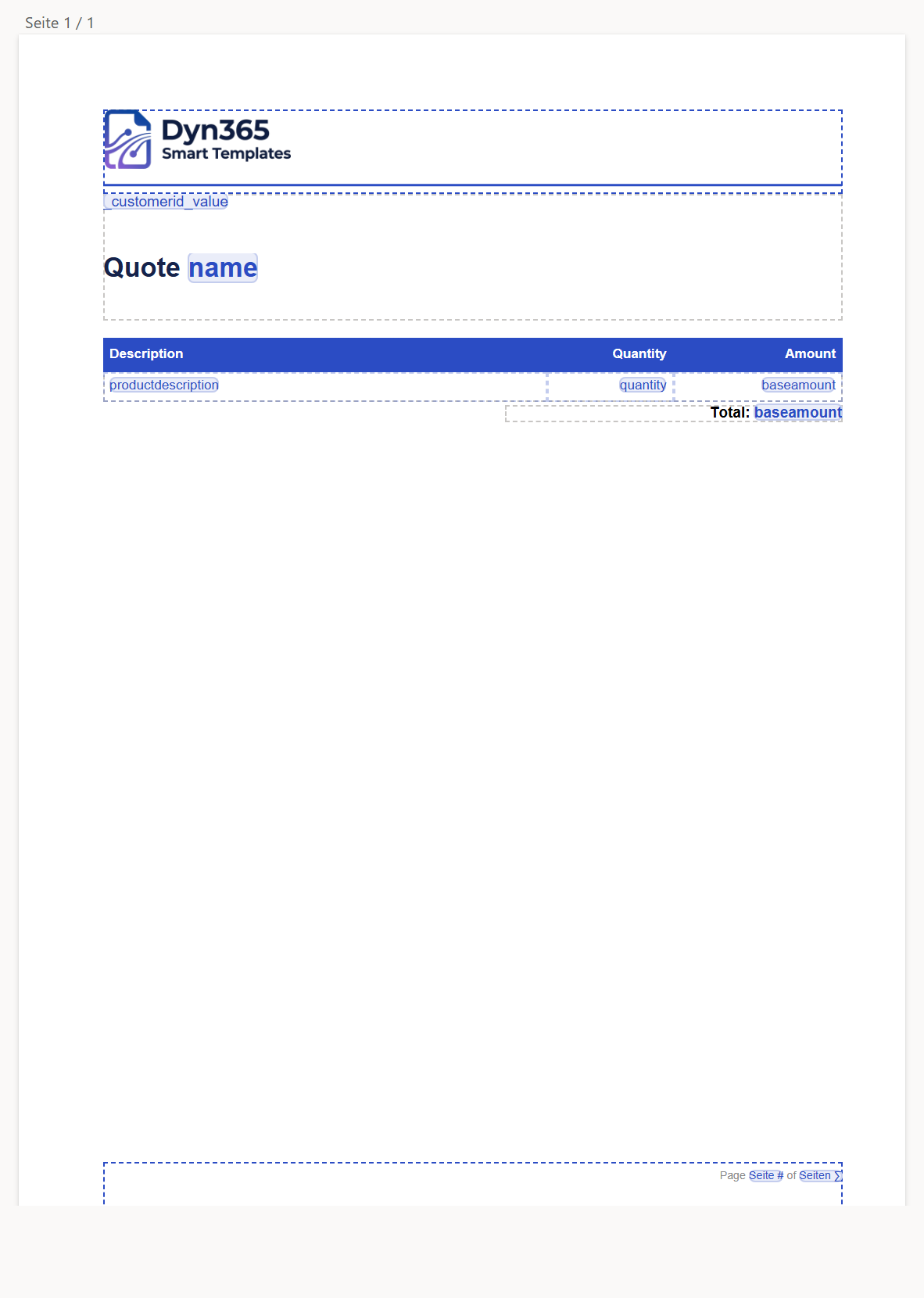
body, in order.
- 1The header: a group with
repeatEveryPageatyMm0, that is, at the top edge of the usable area. It contains the logo (Imagewith the image sourcelogo_full) and the blue line (Line). - 2Customer and title: a group with two texts. The field markers stand for
{{_customerid_value}}and{{name}}; in the PDF the value appears there. - 3The items table:
TablewithitemsPath“Items”, a rule. On the canvas, only the header row and one sample row appear; only the PDF shows all rows. - 4The total: a text with
place“flow”. It keeps its distance from the table and moves down when the table grows in the PDF. - 5The footer: a group with
repeatEveryPageatyMm249, at the bottom of the printed area. It holds the textPage {{Page.Current}} of {{Page.Total}}.
What the check reports on import
Before the designer opens a template file, Dynamics checks it against the structure on this page (see Managing templates: Importing). Errors prevent opening; notes only ask for confirmation. Before each sentence, the report names the place in the template’s structure, for example body[0].type; the sentences are meant for the AI that created the file.
Errors prevent opening. Among other things, the check reports:
- The file is damaged. The report gives the place as line and column, the content of the line and the reason, for example a line break in the middle of a text, a missing character, an extra comma, a file that ends too early or a template that is nested too deeply (there is a maximum number of levels).
- The structure is wrong: the template itself, its page, its brand, lists and individual parts must have the right form.
- Every object needs a valid type: text, image, group, table, grid, line, rectangle, ellipse, triangle, star, arrow, polygon or page break. The report uses their English names, and they are case-sensitive.
- Dimensions and angles must be numbers.
- A table needs at least one column, and every column needs a width greater than 0.
- Rules and variables need a unique name. For the selection of a rule, only these modes are allowed: empty, the top n rows, the first, the last and the nth row.
- Relationships need a name, a type (N:1 or 1:N), a table and a link field; sources need a table, additional sources also the name of their list.
- The text contains a field of a custom variable that does not exist.
- A building block object is built incorrectly:
bausteinis not on a group or in a table cell, the binding is not a path of lookups (N:1), the prefix is invalid, is used twice or has the same name as a custom variable. In a file with"art": "baustein": not exactly one group inbody, a key that does not exist in a building block (for exampleeRechnung,pdfName, a page break), a missing field list on a source or on a relationship with a rule, or a reference the building block does not have. If the file includes its building blocks underbausteine, each of them is checked as well, and so is the template as it looks with them inserted (see Building blocks: Exporting and importing).
Notes only ask for confirmation. Among other things, the check reports:
- The file contains several text blocks; the largest one is read. Or: there is text before or after the template; only the part with the template is read.
- The template has no content. Or: it has no data source; the designer asks for the primary source when opening it. This does not apply to a building block: a building block without a source is a building block “without data”, with fixed content.
- A building block named by a building block object is missing from the file and from this environment; its area would stay empty.
- A text has no width and then appears with one word per line.
- A page break is not directly in the document and therefore has no effect.
- A filter on the table is not read; it belongs in the rule.
- A variable has no type and therefore counts as text, or its type is unknown.
- An included image is not a PNG, JPEG or SVG, or is larger than 5 MB; that place stays empty.
- A relationship is nested more than six levels deep; nothing is printed there.
- Objects directly in the document have no
pageIndex(the sheet, counted from 0). When the file is opened, the designer sets their sheet itself, and that can change the printout; check the “Full preview” afterwards. Header and footer do not need a sheet. With “Upload AI changes” and with the AI assistant, the same is an error as soon as the change leaves such an object behind (see Short rules for AI tools, rule 9). - The decimal places of a calculation (
nachkomma) are not between 0 and 6. With more than 6, the calculation uses 6; with a negative number or a value that is not a number, it uses the decimal places of the template. - A rule has the same name as a field, a relationship (also its own) or the list of an additional source at the same place: “The rule »…« has the same name as the relationship »…« at the same place. …”, likewise “… as the field »…« …” and “… as the list of the source »…« …”. Its result replaces the list or the field there (see Rule). The file can still be opened; the document warns once more when printing.